Why CRM cleanup and enrichment is essential for PLG SaaS companies
Revenue Operations
Feb 19, 2026
Clean and enrich CRM data to improve PQL identification, lead routing, and forecasting for PLG SaaS—reduce duplicates, sync product usage, and automate hygiene.

Your CRM is only as good as the data inside it. For Product-Led Growth (PLG) SaaS companies, messy or outdated CRM data can derail growth strategies. Here’s why cleaning and enriching your CRM is crucial:
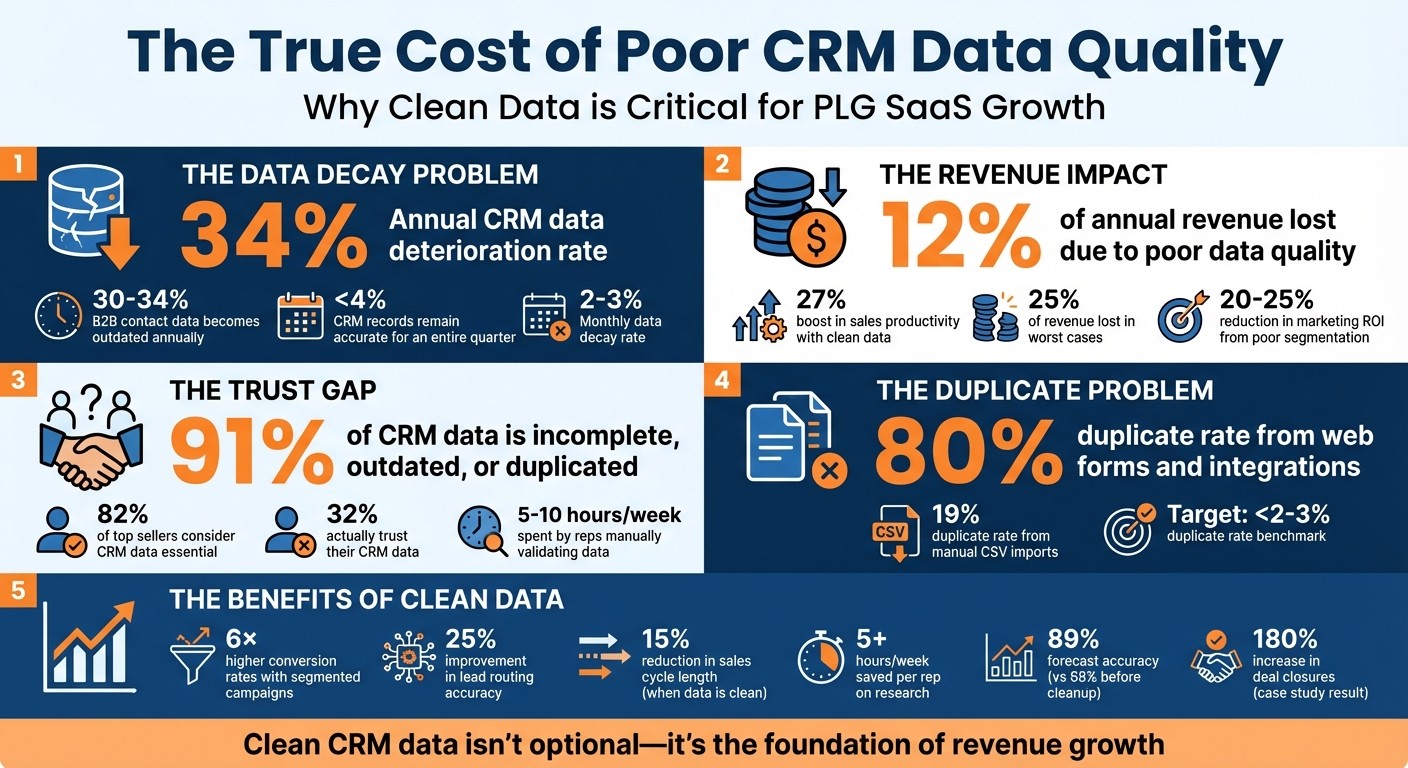
Data Decay: CRM data deteriorates by 34% annually, leading to poor lead scoring and missed revenue opportunities.
Disconnected Signals: Legacy CRMs often fail to integrate product usage data, leaving sales teams blind to high-intent users.
Revenue Impact: Poor data quality can cost companies up to 12% of revenue, while clean data boosts sales productivity by 27%.
Clean CRM data ensures accurate forecasts, better lead routing, and timely outreach to Product Qualified Leads (PQLs). This is especially critical as AI tools increasingly rely on CRM inputs. The process involves regular audits, deduplication, and syncing product usage data to identify and act on high-value accounts.
Key takeaway: CRM cleanup isn’t a one-time task - it’s the backbone of efficient revenue operations and sustained growth for PLG SaaS companies.
The Cost of Poor CRM Data Quality: Key Statistics for PLG SaaS Companies
How to Solve The Biggest Problem In Your CRM, Without Breaking Anything
Common CRM Data Problems in PLG SaaS Companies
For PLG SaaS companies, maintaining clean and accurate CRM data is essential to ensure reliable metrics and sustained growth. Yet, many face persistent challenges like duplicate records, incomplete data, and poor segmentation, which can derail their efforts.
Duplicate Records, Incomplete Data, and Poor Segmentation
The quality of your CRM data directly affects its reliability. Duplicate records are a frequent issue, often inflating pipeline figures. For example, a $200,000 deal can appear as $400,000 simply because the same contact is entered twice. These duplicates usually stem from partial matches - think "John Smith" versus "Jon Smyth" - or from systems that lack proper deduplication processes. Interestingly, web forms and integrations contribute to an 80% duplicate rate, compared to just 19% for manual CSV imports.
Incomplete data is even more pervasive. A staggering 91% of CRM data is either incomplete, outdated, or duplicated. Missing fields such as job titles, company size, or product usage metrics often result from rushed manual entries or overly simplistic form fields. This can have real consequences - without a "Company Size" field, for instance, high-value enterprise trials might not reach the right sales rep. Similarly, if product usage data remains stuck in analytics tools and doesn’t sync with the CRM, identifying Product Qualified Leads becomes nearly impossible.
Poor segmentation adds another layer of complexity. Inconsistent formatting - like "VP of Sales" versus "Vice President of Sales" or "California" versus "CA" - can break automations and render segment reporting useless. The result? Misguided campaigns, such as sending cybersecurity emails to e-commerce managers, which damages the brand experience and reduces marketing ROI by 20-25%.
To make matters worse, B2B contact data becomes outdated at a rate of 30-34% annually due to job changes, acquisitions, and evolving tech stacks. Shockingly, less than 4% of CRM records remain accurate for an entire quarter. One Series B SaaS company tackled this issue in late 2024 by introducing stage-gate validation rules. These required Account Executives to confirm contact employment status before advancing deals to "Proposal Sent." The result? Forecast accuracy jumped from 68% to 89% in just one quarter.
These data issues distort key metrics, leading to misaligned sales strategies and wasted resources.
How Dirty CRM Data Affects PLG Metrics
Poor CRM data doesn’t just create internal headaches - it directly undermines critical PLG metrics. Without accurate data, identifying high-intent users and timing outreach effectively becomes nearly impossible.
For instance, incomplete data can skew lead scoring, which disrupts the trial-to-paid conversion process. High-intent leads may remain unassigned or get routed to the wrong reps if their product usage data isn’t synced to the CRM. Meanwhile, sales reps spend 5-10 hours per week manually validating data they don’t trust, instead of focusing on selling. Although 82% of top-performing sellers consider CRM data essential, only 32% actually trust it.
Misaligned data also extends sales cycles by 15%, as reps waste time chasing contacts who may have left their companies months ago. This leads to bloated forecasts that fail to materialize. Additionally, AI-powered tools like lead scoring systems and autonomous SDR platforms rely on CRM data. If the data is flawed, these tools produce generic outreach and unreliable forecast confidence intervals.
"CRM data hygiene isn't an admin task. It's the foundation that every revenue-critical function depends on: forecasting, lead routing, territory design, pipeline reporting, and marketing attribution."
Jordan Rogers, RevenueTools
The financial impact is significant. Companies lose an average of 12% of their annual revenue due to poor data quality. On the flip side, segmented campaigns can achieve conversion rates up to six times higher than non-segmented ones - but only when they’re built on clean, accurate data.
Addressing these data challenges is the first step toward effective CRM cleanup and improved operational efficiency.
How to Clean Up Your CRM Data: A Step-by-Step Guide
For PLG SaaS companies, keeping your CRM data clean is crucial for effective lead scoring and timely outreach. CRM maintenance isn’t a one-and-done task - it’s an ongoing effort that ensures your revenue engine stays efficient. A structured approach can help you tackle problems, fix them quickly, and stop them from happening again.
Audit Your CRM Data for Problems
Before diving into fixes, start by setting clear data standards. Define how fields like job titles, phone numbers (with country codes like +1 for U.S. numbers), and company names should be formatted.
Run reports to check for missing or incomplete data in critical fields such as email, company name, job title, and lead source. For example, create lists that surface gaps like "Industry is unknown" or "Job Title is unknown". If you’re using HubSpot, the Data Quality Command Center provides a dashboard view of missing values and formatting issues. You can also filter by engagement metrics, such as "last marketing email open date" or "recent sales email replied date", to identify unengaged leads clogging your database.
Spot duplicate records using AI-driven deduplication tools to find both exact and fuzzy matches. Also, filter for inactive or outdated records, including those with hard bounces, unsubscribes, or no recent activity. Keep in mind that about 30% of a B2B database becomes outdated every year, with data decaying at a rate of 2–3% per month.
"Data hygiene isn't just operational maintenance, it's a competitive advantage." - Angel Palaganas, RevOps Specialist
Aim to conduct full audits at least twice a year, supplemented by quarterly mini-audits to prevent data issues from piling up. Once your audit is complete, you can move on to merging duplicates and standardizing your data.
Remove Duplicates and Standardize Data
Duplicates and inconsistent data formats can cause chaos. Tools like HubSpot simplify this process by automatically merging contacts based on email addresses and companies by primary domain during imports or form submissions. However, for records that slip through the cracks, the Manage Duplicates tool uses machine learning to flag potential duplicates by analyzing names, emails, domains, and phone numbers.
When manually merging records, use the "Review" function to decide which property values to keep for each duplicate pair. To avoid creating duplicates during imports or when using third-party tools, always match records by HubSpot's Record ID. For formatting issues, the "Formatting issues" tab lets you bulk-fix problems like inconsistent capitalization (e.g., changing "LORELAI" to "Lorelai") or standardizing phone numbers.
Clean your data before enriching it - adding information to messy records only amplifies errors. To prevent future issues, set up validation rules that enforce data standards at the point of entry, such as requiring key fields during manual record creation.
Set Up Automated Data Cleanup Workflows
Once you’ve addressed manual corrections, automation can help maintain data quality over time. Set up workflows to clean data as it’s entered, ensuring records are standardized before they reach your sales or marketing teams.
HubSpot’s "Fix and automate" feature in the Data Quality tool allows you to create permanent rules for common formatting problems. For example, you can automate steps like fixing capitalization, removing unnecessary symbols, and correcting typos - all in one sequence.
Configure workflows to skip blank values or update only empty fields, so good data isn’t overwritten. You can also set up workflows to reassign accounts owned by inactive users to active sales reps. Weekly workflows can clear out "test" or "dummy" records, such as those with "test" in the name or internal company email domains.
For example, Quick Attach, a construction equipment company, implemented automated workflows in 2022 to deduplicate and format incoming leads within minutes. This prevented duplicate mailings and ensured sales reps didn’t accidentally work on the same accounts.
Finally, create a Data Hygiene Dashboard to monitor metrics like duplicate rates, incomplete records, and unengaged contacts in real time.
Data Enrichment Methods for Better Lead Scoring and Segmentation
Once your CRM is clean, the next step is to make it even more powerful by enriching it with targeted data. Enrichment transforms raw records into actionable insights. For PLG (product-led growth) SaaS companies, this means integrating product usage patterns, firmographic data, and market signals to pinpoint which users are ready to convert and which require additional nurturing.
Connect Product Usage Data to Your CRM
In a PLG model, product usage data is one of the strongest indicators of revenue potential. A PLG-focused CRM doesn’t just track customer interactions with your sales team - it also monitors how users engage with your product. By integrating this data, your team can identify high-priority accounts and tailor conversations to encourage deeper product adoption.
For example, syncing lead scores from billing and product usage data stored in your data warehouse allows you to replace traditional sales stages with product milestones like "Signed Up", "Invited Team Members", or "Reached Usage Limit." You can also set up automated alerts to flag accounts where usage starts to drop, providing an early warning for potential churn.
This integration creates a foundation for customizing your CRM to reflect the unique goals and milestones of a PLG strategy.
Create Custom Properties for PLG Metrics
Custom properties in your CRM are essential for tracking key PLG metrics like activation milestones, feature adoption, and user engagement patterns. To keep things organized, use standardized naming conventions, such as contact_plg_activation_status or company_plg_monthly_active_users. Focus only on properties that drive specific actions - like lead scoring, routing, or workflows - since unnecessary fields can clutter your CRM.
When setting enrichment rules, configure them to "fill empty values only" to avoid overwriting manually entered data. Each custom property should include a clear description, the data source (e.g., API sync, calculated, or manual), and an assigned owner within your team. For context, the average HubSpot portal has 300–500 custom properties, but only 30–40% are actively used. A quarterly audit can help identify duplicates and remove properties with less than 5% usage.
With these properties in place, you can refine your targeting efforts using deeper market insights.
Use Market Research to Refine ICP Targeting
Adding market research data to your CRM enhances segmentation and sharpens your Ideal Customer Profile (ICP). Firmographic details - like company size, revenue, and growth trends - combined with technographic insights about the tools and technologies a business uses, help your team create more personalized and relevant outreach.
A waterfall enrichment strategy works best for ensuring high-quality data. This approach prioritizes internal data first, followed by premium databases, and finally AI-driven web research. Tools like ZoomInfo (with over 260 million contacts), Apollo (around 210 million contacts), Datanyze, and Crunchbase are excellent sources for robust market research data. To maintain accuracy, prioritize user-provided data over third-party enrichment and focus full enrichment efforts on high-fit leads using signal-based triggers.
Clean, enriched data doesn’t just improve CRM usability - it can lead to a 30% increase in sales revenue and boost email response rates by 50–100% through highly personalized outreach.
Using Multithread for Automated CRM Enrichment and Outreach
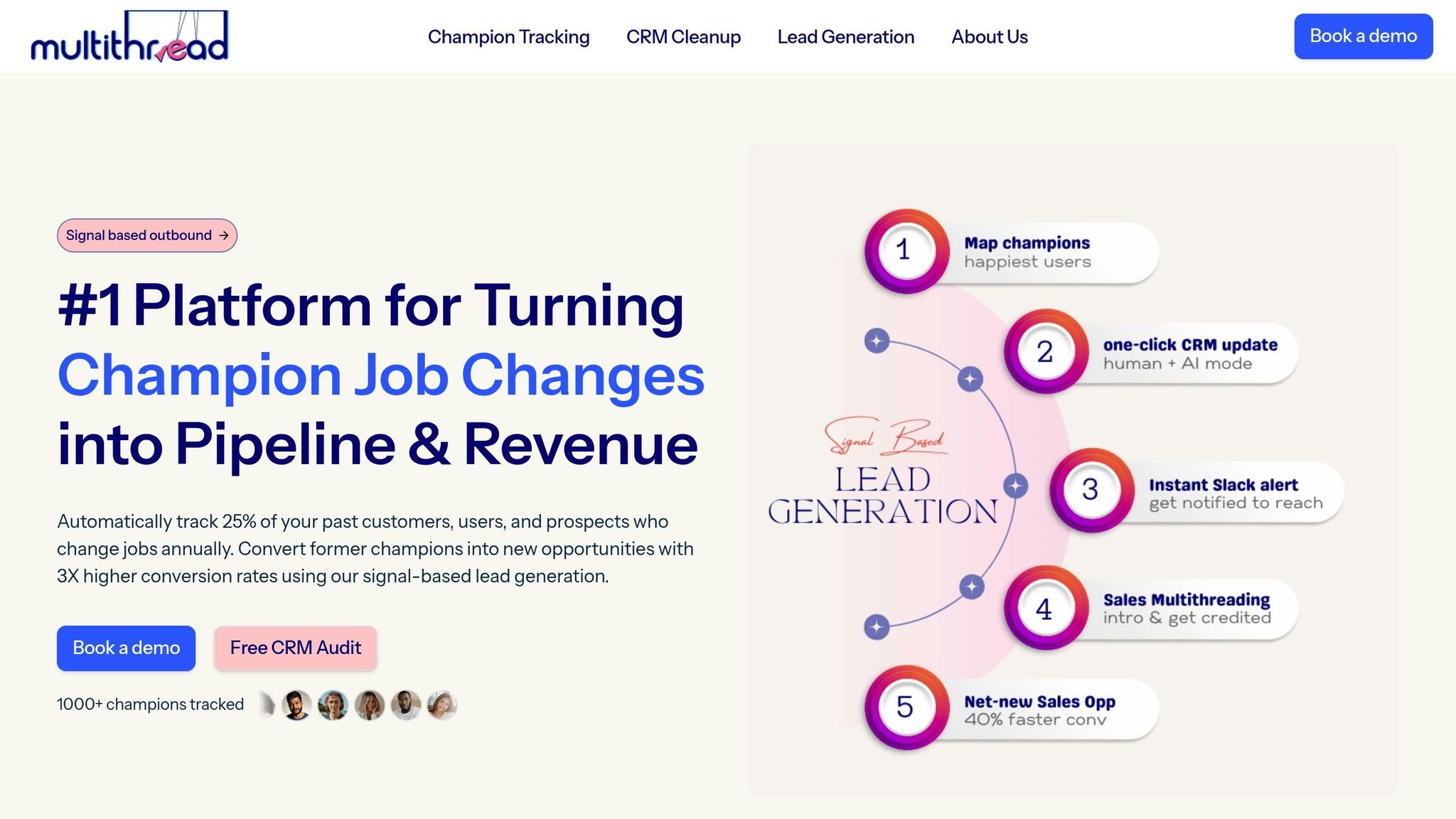
Once you've cleaned up your data and set up custom properties, the next hurdle is maintaining enrichment at scale while engaging high-value leads. Multithread simplifies this by combining automated CRM enrichment with targeted outreach, tailored for PLG SaaS companies that need to act fast on product-qualified leads.
How Multithread Enriches CRM Data
Multithread works by querying multiple data sources in a specific order. It starts with your internal data, moves on to premium databases, and finally uses AI-powered web research to fill any remaining gaps. This layered approach ensures high accuracy while keeping costs in check by avoiding unnecessary lookups.
The enrichment process is triggered in real-time via APIs whenever a new contact is added to your CRM - whether it's through form submissions, lead imports, or manual entries. Before your sales team even gets involved, records are automatically updated with LinkedIn profiles, direct phone numbers, and technographic data. You can map these updates to custom CRM properties, ensuring the enriched data aligns with your workflow. A quick data audit can help identify which fields are missing or outdated, so you can prioritize what needs to be enriched first.
This enriched data becomes the foundation for targeted, automated outreach.
Automate Outreach with Multithread
With enriched data in place, Multithread shifts seamlessly to automated outreach. The platform supports omnichannel campaigns, focusing on email and LinkedIn to engage product-qualified leads.
The LinkedIn LeadGen plan ($500) is tailored for LinkedIn campaigns, offering personalized messaging, competitor analysis, and calendar booking for around 1,000 leads.
The Multichannel LeadGen plan ($2,000) expands the scope to both email and LinkedIn, managing approximately 10,000 leads. This plan also includes CRM updates and workflows to re-engage no-shows.
Sales and marketing specialists handle everything from crafting campaign copy to building lead lists and setting appointments. This eliminates the burden of manual segmentation and message personalization, freeing your team to focus on closing deals rather than managing outreach logistics.
Track Engagement and Measure Results
Multithread offers detailed reporting to track the metrics that matter most to PLG companies. You can monitor email open rates, response rates, and bounce rates, alongside key funnel metrics like MQL-to-SAL conversions and lead-to-customer rates. Every plan includes comprehensive performance tracking, giving you a clear view of which segments are performing well and where you might need to refine your targeting approach.
How to Measure the Impact of CRM Cleanup and Enrichment
Once you've enriched your CRM data, measuring its impact is crucial to ensure the improvements stick and deliver value.
CRM cleanup isn't a one-and-done task - it requires ongoing attention. Its benefits show up quickly in key metrics for product-led growth (PLG) companies, like better lead scoring and faster pipeline movement.
Key Metrics to Track After Cleanup
Before diving into cleanup, establish a baseline. Record your duplicate rate, field completion, and email bounce rate. These numbers act as your "before" snapshot.
Post-cleanup, focus on six core aspects of data quality:
Accuracy: Does the data reflect reality?
Completeness: Are essential fields filled out?
Consistency: Is the formatting uniform?
Timeliness: Is the data up-to-date?
Validity: Are formats correct?
Uniqueness: Are duplicates removed?
For PLG companies, prioritize fields that help identify product-qualified leads (PQLs), such as product usage data, industry, and employee count.
"CRM data hygiene is a revenue discipline, not an admin chore." - Jordan Rogers, RevOps Leader, RevenueTools
Set benchmarks to measure success: aim for a duplicate rate under 2%, an email bounce rate below 2%, and 90%+ field completion for critical fields. Track your enrichment match rate - the percentage of records successfully updated by tools - and target over 80%. For active accounts, ensure 95% or more of contacts are verified or updated within 90 days.
Beyond these metrics, evaluate business outcomes like lead-to-opportunity conversion rates, improved lead routing (which can see a 25% boost with clean data), and shorter sales cycles. For PLG models, pay attention to trial-to-paid conversion rates and how quickly you can identify PQLs. Clean data can also save reps over five hours a week on manual prospect research, giving them more time to close deals.
With these metrics in place, you'll have a clear picture of how clean data drives tangible results.
Calculate the Benefits of CRM Optimization
Better metrics lead to measurable gains in revenue and efficiency. Poor CRM data can cost companies 10-12% of annual revenue, with some cases reaching as high as 25%. For a team of 50 reps managing 100,000 CRM contacts, data decay can affect around 30,000 records annually. If 20% of those lost records could have turned into meetings, that's 600 missed opportunities - equivalent to $300,000 in lost pipeline value, assuming a $500 acquisition cost per opportunity.
In June 2025, a mid-market e-commerce firm addressed CRM issues after finding 30% of its Salesforce contacts were duplicates and 15% lacked industry data. Using tools like Dedupely and ZoomInfo, they reduced duplicate rates to under 2%, increased industry field completion to 98%, and cut email bounce rates by 40%. These changes powered a targeted account-based marketing campaign that generated 25% more opportunities in just one quarter.
Similarly, SaaS company Ceros launched a CRM cleanup in 2025, focusing on de-duplication and standardization with HubSpot Sales Hub. The results? An impressive 180% increase in deal closures, an 18% rise in Sales-Qualified Leads, and lead response times dropping below five minutes.
Metric | Target Benchmark | Business Impact |
|---|---|---|
Field Completion Rate | > 90% | Better lead scoring and segmentation accuracy |
Duplicate Rate | < 2-3% | More accurate forecasts and fewer double-outreach issues |
Email Bounce Rate | < 2% | Maintains domain reputation and improves deliverability |
Enrichment Match Rate | > 80% | Ensures most of the total addressable market is actionable |
Lead Routing Accuracy | +25% improvement | Faster lead response times and better rep alignment |
Research Hours Saved | 5+ hours/rep/week | More time for selling and improved morale |
Use dashboards to track metrics like duplicate creation rates and email bounce rates in real time. Regular monitoring ensures your cleanup efforts continue to deliver value over time.
Conclusion
Key Strategies Recap
Keeping your CRM clean and enriched isn’t a one-and-done task - it’s an ongoing process that safeguards revenue and supports growth. Start by setting clear standards before investing in any tools. This means defining mandatory fields, consistent naming conventions, and standardized picklist values to ensure uniform data entry. Then follow the essential cycle: Clean, Enrich, Validate, Maintain. Remember, enriching incorrect data only amplifies errors.
To stay ahead, automate maintenance tasks. Run weekly duplicate checks, review segments monthly, and conduct deep audits every quarter to combat the 34% annual data decay rate. Use structured picklist entries instead of free text to minimize bad data from the start. When enriching your records, consider a waterfall enrichment method - querying multiple data providers in sequence to boost coverage while managing costs.
Track the metrics that matter most: aim for a duplicate rate under 3%, keep email bounce rates below 2%, and maintain over 90% field completion for critical properties. These benchmarks directly impact business outcomes. Clean data improves lead routing, shortens sales cycles, and frees up time for reps to focus on selling instead of hunting for information. For PLG SaaS companies, these practices are especially critical for linking product usage data to real-time engagement. By following these steps, you’ll not only improve your data today but also secure better performance in the future.
The Long-Term Value of Clean CRM Data
Clean CRM data does more than just tidy up your database - it strengthens every key revenue function. Accurate data is essential for forecasting, lead routing, territory planning, pipeline reporting, and marketing attribution. By 2026, this foundation becomes even more vital as AI tools for lead scoring and outreach increasingly rely on CRM inputs. Poor data quality isn’t just inconvenient - it’s expensive, costing companies 10–12% of their annual revenue. It also wastes time, with sales and marketing teams spending up to 32% of their hours fixing data issues instead of driving results.
The benefits of clean data are undeniable. Accurate segmentation can increase campaign conversion rates by up to 6×, and sales reps save over five hours per week on manual research. Most importantly, clean data rebuilds trust. While 82% of top-performing sellers see CRM data as critical to their success, only 32% trust the data they work with. Routine maintenance bridges this trust gap, enabling decisions based on reliable data rather than guesswork. For PLG companies that depend on connecting product usage data to CRM records for timely outreach, clean data isn’t just helpful - it’s the backbone of their growth engine.
FAQs
How often should we clean our CRM?
Keeping your CRM data accurate and up-to-date is crucial for ensuring smooth operations. Many experts suggest conducting routine checks either monthly or at least quarterly. Skipping these updates can result in outdated or incorrect data, which could hurt your bottom line - potentially impacting revenue by 25-30% each year.
By staying on top of CRM maintenance, you can improve segmentation, refine lead scoring, and enhance overall operational efficiency.
Which fields matter most for PQL scoring?
Key areas to focus on for PQL scoring include product usage signals like how users engage with features, reach key milestones, and exhibit behaviors that show they’re adopting the product and finding value in it. These metrics spotlight the leads most likely to convert by emphasizing their significant interactions and progress within the product.
How do we prevent new duplicates?
Preventing duplicates in a CRM requires a mix of proper processes and tools to maintain clean, accurate data. Start by standardizing key identifiers, such as email addresses and company names, to ensure consistency. Enforce validation rules during data entry to catch potential duplicates early, and use matching rules to decide whether to update an existing record or create a new one.
Another helpful approach is implementing a "search before create" policy, where users check for existing records before adding new ones. Regularly monitor duplicate rates within your system to identify trends or gaps in your process. Finally, establish clear guidelines for merging records, ensuring profiles stay complete and accurate without losing critical information.