

Why Your Outbound Campaigns Aren't Converting
Revenue Operations
Feb 16, 2026
Feb 16, 2026
Poor targeting, generic copy, CRM misuse, missed signals, and sales-marketing silos are killing reply rates—fix these to raise conversions and deliverability.
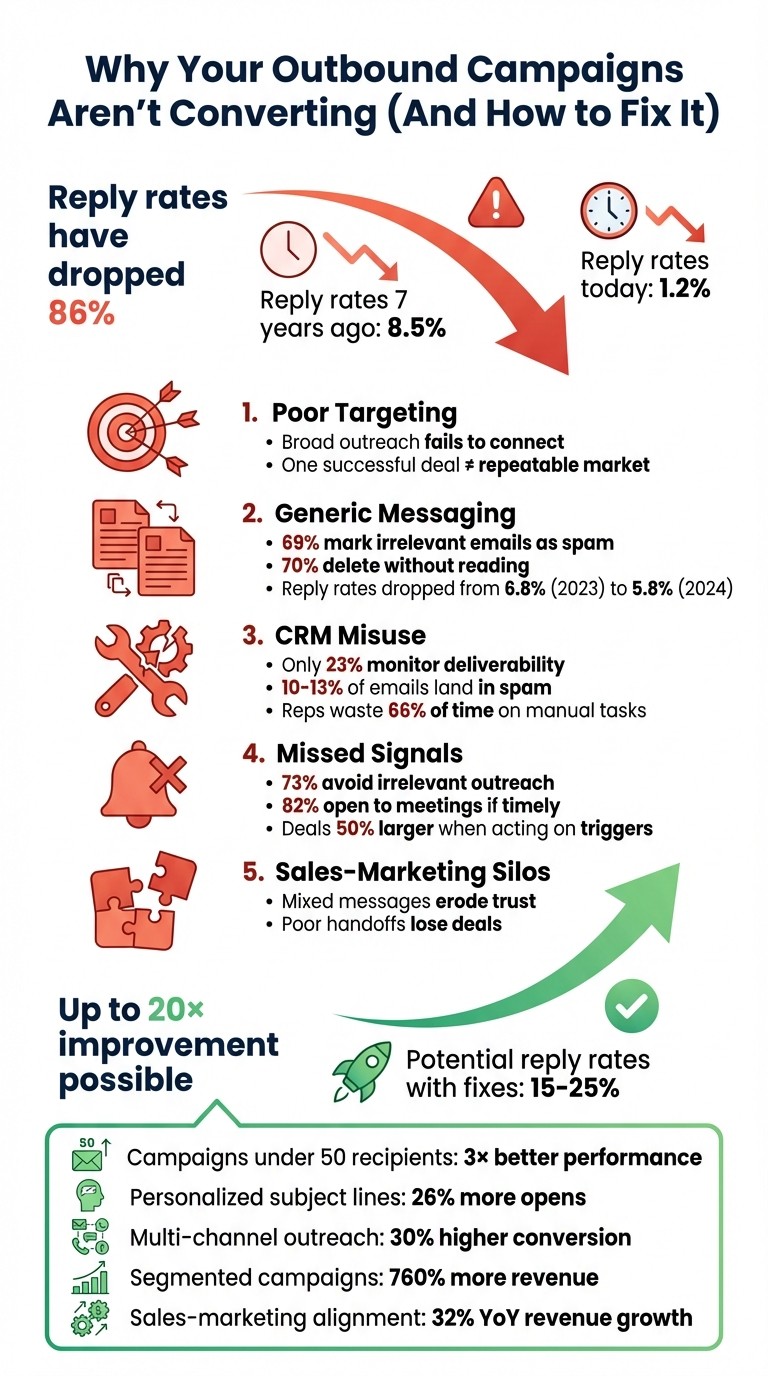
Your outbound campaigns are struggling because outdated methods no longer work. Here’s why reply rates are as low as 1.2% today (down from 8.5% seven years ago):
Poor Targeting: Broad outreach and irrelevant segmentation fail to connect with the right audience.
Generic Messaging: Templated emails focused on your product - not the recipient’s needs - get ignored.
CRM Misuse: Inefficient workflows and bad email practices (like unverified lists) hurt deliverability, often requiring HubSpot CRM cleanup to restore performance.
Missed Signals: Ignoring job changes or key events means lost opportunities to re-engage warm leads.
Sales-Marketing Silos: Lack of team alignment creates mixed messages and missed handoffs.
The solution? Sharpen your targeting, write messages that address recipient needs, use CRM tools effectively, and align your sales and marketing teams. With these fixes, reply rates can climb to 15–25%.
Let’s break down how to solve these issues and get your campaigns back on track.
Outbound Campaign Reply Rates: 5 Problems and Solutions to Increase Conversions
The 10 Rules of Outbound Sales You Need to Know
Why Your Outbound Campaigns Aren't Working
Outbound campaigns often fail due to a series of avoidable mistakes that build on one another. With reply rates dropping to just 1.2%, the issue isn’t bad luck - it’s breakdowns in the way these campaigns are designed and executed. Let’s dive into five critical problems that might be holding your campaigns back.
Bad Targeting and Segmentation
Many teams approach segmentation as a box-ticking exercise - filtering by industry, company size, or job title - without considering why the message should matter to the recipient right now. A common misstep is building your Ideal Customer Profile (ICP) around one successful deal that might have been a one-off. One closed deal with a complex sales cycle and multiple stakeholders doesn’t necessarily define your repeatable market. Founders often resist narrowing their Total Addressable Market, which leaves messaging too vague to resonate with anyone.
Another issue is relying solely on job titles. A VP of Marketing at a 50-person startup has vastly different priorities than a VP of Marketing at a 5,000-person enterprise. Without firmographic filters - like revenue, tech stack, or growth stage - your outreach list can become too broad to perform well. Scaling outreach with AI doesn’t fix this; it simply means reaching more of the wrong people faster.
Timing also matters. Ignoring trigger events, like new funding or leadership changes, makes your outreach feel random. When one segment performs well and others don’t, the problem often lies in flawed targeting - not in your email copy or subject lines.
Generic Messaging Without Personalization
Adding a merge tag like {{FirstName}} isn’t enough to make your emails feel personal anymore. Prospects can easily recognize templated outreach, and 69% of recipients mark irrelevant emails as spam. Generic messages tend to focus on “we,” “our product,” and “our features,” instead of addressing the recipient’s specific challenges. In B2B sales, where 6–10 stakeholders are involved - each with their own priorities - a one-size-fits-all approach fails to connect. Unsurprisingly, 70% of recipients delete irrelevant emails without even reading them.
"If your email is all about you, it's easy to see why you're getting ignored by prospects who only have time to think about the problems they need to solve." – Leslie Venetz, Founder, The Sales-Led GTM Agency
The downward trend in reply rates - from 6.8% in 2023 to 5.8% in 2024 - shows that buyers are becoming better at filtering out irrelevant outreach. While segmented campaigns can increase open rates by 30% and click-throughs by 50%, this only works if the segmentation is meaningful and tied to real-time business needs. Even then, nearly half of personalized messages (48%) are still seen as irrelevant or intrusive, proving that superficial personalization isn’t enough.
On top of that, poor use of CRM tools can further derail your efforts.
Not Using Your CRM Tools Properly
Tools like HubSpot offer powerful features for automation and tracking, but many teams misuse them. A common mistake is using HubSpot’s marketing email tool for cold outreach instead of its Sequences feature, which is designed for one-to-one communication. Marketing tools are meant for opted-in contacts; using them for cold outreach can harm your domain’s deliverability.
Another issue is importing unverified contact lists, which increases bounce rates and damages your sender reputation. Shockingly, only 23% of sales teams actively monitor email deliverability, meaning 10–13% of emails could be landing in spam folders without anyone noticing. Manual outreach adds to the inefficiency, with reps spending up to 66% of their time on repetitive tasks like copying emails and updating records. Centralizing outreach within your CRM can save 5–10 hours per week and even shorten sales cycles by 8–14%.
Focusing on vanity metrics, like open rates, is another pitfall. Open rates mean little if they don’t lead to meetings or pipeline growth.
"A high open rate is meaningless if it doesn't produce meetings and pipeline - optimize for downstream outcomes, not vanity metrics." – SalesHive
Additionally, poorly defined CRM workflows often result in missed opportunities. When Sales Development Representatives (SDRs) and Account Executives (AEs) fail to coordinate properly, potential deals can slip through the cracks.
Missing Champion Signals and Job Changes
Your best leads aren’t always new ones - they’re often former champions who’ve moved to new companies. Tracking these job changes is vital, as these individuals often bring their challenges, budgets, and trust in your product to their new roles. Failing to monitor these shifts means missing out on prime opportunities to re-engage.
Data shows that 73% of B2B buyers avoid irrelevant outreach, but 82% are open to meetings if the outreach feels timely and valuable. Former champions represent a unique opportunity to close deals faster and with higher success rates. However, if a key contact leaves or is reassigned during an active deal, the opportunity can stall or fall apart. Without processes to track job changes and trigger events like new funding or leadership shifts, these signals can easily go unnoticed. Yet, acting on them can lead to deals that are, on average, 50% larger.
Sales and Marketing Teams Working in Silos
When sales and marketing operate in silos, the buyer experience suffers. Misaligned teams often send mixed messages - marketing might promote one value proposition in a nurture email, while an SDR follows up with a completely different pitch. This inconsistency creates confusion and erodes trust, making it harder to close deals.
Poor handoffs are another symptom of siloed operations. Marketing might pass a lead to sales after a form fill, labeling it as “qualified” without any real context. The SDR then discovers that the lead lacks budget or authority, leading to frustration and finger-pointing between teams. Without a shared definition of what “qualified” means and a unified view of the buyer journey, these problems persist.
Siloed reporting further complicates things. Marketing focuses on metrics like MQLs and open rates, while sales tracks meetings and pipeline. This disconnect leads each team to optimize for their own goals rather than collaborating to drive revenue.
Coordinated follow-up is key. Using multiple channels - like email, phone, and LinkedIn - can boost conversion rates by about 30%. But this only works when both teams are aligned and working together effectively.
How to Fix Your Outbound Campaign Performance
Improving your outbound campaigns doesn’t mean you need to reinvent the wheel. Instead, focus on fixing specific issues like targeting, messaging, workflows, and team coordination. Here’s how you can get your campaigns back on track.
Improve Targeting with HubSpot Segmentation and Multithread
If your targeting feels off, it’s time to rethink your segmentation strategy. Think of segmentation as a decision-making tool: Who should you target? Why now? What’s the goal?.
HubSpot’s dynamic lists are a great way to start. Unlike static lists that need manual updates, dynamic lists adjust automatically based on real-time data like lifecycle stage, website activity, email engagement, and custom properties. For example, you could create a list of contacts who visited your pricing page in the past week and work at companies with 50–500 employees.
To make targeting even sharper, use data enrichment and sub-segmentation. Instead of sending mass emails to 5,000 marketing managers, break them into smaller groups using factors like job titles, tech stack, or recent events. Campaigns targeting 50 or fewer recipients tend to perform nearly 3× better than broad outreach. With precise targeting, cold B2B campaigns can hit a 27.7% open rate and a 5.1% reply rate.
Multithread’s market research services can help you uncover high-value segments by analyzing your ideal customer profile and spotting patterns among your top customers. Pair this with HubSpot’s custom properties - like “Buying Role” or “Trigger Event” - to build automated segments that reach prospects at the perfect time.
Timing is everything. Reaching out within 5 minutes of a signal (like a pricing page visit) makes you up to 21× more likely to qualify a lead. Use HubSpot’s behavioral triggers to launch sequences automatically when high-intent actions occur.
And don’t forget to clean your data before segmenting. Audit and standardize contact details - like company names and job titles - to avoid targeting mistakes. Using dropdown menus instead of free-text fields can help keep your data organized over time.
Write Better, More Personalized Messages
Personalization goes beyond just using someone’s first name. Dive deeper by leveraging role-specific details, account activity, and behavioral triggers.
Follow the 80/20 rule: Make 80% of your message about the prospect’s needs and only 20% about your solution. For instance, instead of generic lines like “Congrats on your funding round!”, try: “I saw you raised $25M in Series B. As you scale your sales team, here’s how a similar customer kept pipeline visibility during rapid growth”. This shows you’ve done your homework.
Keep your emails short - between 50 and 150 words - and easy to read in under 30 seconds. Avoid corporate jargon and write like you’re emailing a colleague. Use low-pressure calls to action, such as “Worth exploring?” or “Does this sound relevant?” instead of pushing for a lengthy meeting right away.
"If your email doesn't sound like something a real person would send to one specific person, it won't earn a real person's reply." – SalesHive
HubSpot’s personalization tokens and A/B testing tools are great for experimenting with subject lines, opening hooks, and CTAs. Personalized subject lines, for example, are 26% more likely to be opened than generic ones. Even small tweaks, like using an all-lowercase subject line (“quick question about your sales process”), can make your email feel more personal.
Multithread’s copywriting services can help craft these messages, pulling insights from LinkedIn posts, company news, and recent events. Campaigns with advanced personalization see reply rates around 17%, compared to just 7% for generic emails.
Once you’ve nailed your targeting and messaging, it’s time to streamline your follow-up process.
Automate Your Workflows for Consistent Follow-Up
Automation is key to keeping your outreach efficient and consistent. HubSpot Sequences is ideal for one-to-one cold outreach, unlike marketing email tools that are better suited for opted-in contacts. Using the wrong tool can hurt your deliverability.
Build multi-touch sequences with 3–5 interactions across email, phone, and LinkedIn. Research shows this approach significantly boosts reply rates compared to single-touch outreach. Combining channels can even double your chances of getting a response.
Set up specific triggers tied to lifecycle stages in HubSpot. For example, if someone visits your pricing page, move them to “MQL” and enroll them in a sequence tailored to high-intent leads. Use suppression lists to avoid over-messaging prospects who are already in active sales cycles or have been contacted recently.
Multithread integrates seamlessly with HubSpot, automating lead nurturing and CRM updates so that every interaction is logged and follow-ups happen on time. This prevents leads from slipping through the cracks.
Don’t overlook email health. Use HubSpot’s Email Health tool to monitor deliverability, as 10–13% of emails could land in spam if hygiene isn’t maintained. Verifying email addresses and gradually warming up your domain can protect your sender reputation.
Track Champions and Job Changes with Multithread
When former champions move to new companies, they can become your biggest advocates. They already trust your product and can provide valuable insights in their new roles.
Executives in new positions often evaluate vendors within their first 90 days. Job changes create an opportunity to reconnect, especially with a message like “From your [Prior Company] days,” which immediately builds rapport.
Multithread’s champion tracking and job change alerts keep tabs on key contacts who switch roles, syncing these updates to HubSpot. This allows you to send timely, personalized follow-ups when they’re most likely to engage. For example, if a VP of Sales who used your product moves to a new company, you can reference their past experience and offer to help with similar challenges.
Tailored email templates for job changes can boost open rates by 10% and double reply rates compared to standard benchmarks. Combine this with other triggers, like funding announcements or company expansions, to make your outreach even more relevant.
Align Sales and Marketing with Better Reporting
Siloed operations between sales and marketing can hurt the buyer experience. Misaligned teams often send conflicting messages and struggle with poor handoffs, which ultimately affects revenue.
Multithread’s omnichannel outreach and reporting tools create shared dashboards and data visibility for both teams. This unified approach ensures everyone works with the same insights, delivering a smooth and consistent experience for prospects.
Conclusion: Get Better Results with the Right Approach and Tools
Improving your campaign performance isn't about luck - it's about using the right tactics and tools. By focusing on precision targeting, personalized messaging, effective CRM management, and team alignment, you can shift from reply rates as low as 1.2% to an impressive 15–25%. These aren't just helpful tips - they're the foundation of a successful campaign.
Start by refining your Ideal Customer Profile (ICP). Campaigns targeting smaller, more focused groups (50 recipients or fewer) perform nearly three times better than mass email blasts. Use tools like HubSpot's dynamic lists and behavioral triggers to engage prospects at the perfect moment. Then, craft messages that address their specific challenges - not just surface-level personalization like their name. Research shows that segmented campaigns can drive up to 760% more revenue compared to generic emails.
"Precision beats volume every time." – Cold Call Me
Keep your data clean by scheduling monthly updates, and use automation to manage multi-touch sequences. Don't overlook the importance of tracking job changes - new executives often evaluate vendors within their first 90 days, making them prime opportunities. Tools like Multithread's champion tracking and its integration with HubSpot ensure these opportunities don’t slip through the cracks. Automated workflows can also help you maintain consistent follow-ups across email, LinkedIn, and phone.
Lastly, tear down the walls between sales and marketing. When these teams work together, sharing data and goals, the result is a seamless experience for prospects - and a 32% increase in year-over-year revenue growth. Aligning these efforts ensures your campaigns not only connect but also convert. By applying these strategies and embracing the right tools, you can take your outbound results to the next level.
FAQs
How do I know if my targeting is the real problem?
To figure out if targeting is the problem, start by examining the quality of your prospect list. Issues like outdated contact information, incorrect job titles, or a mismatch with your Ideal Customer Profile (ICP) can cause trouble. If you're seeing low response rates or getting leads that aren't a good fit, poor targeting might be the culprit.
Make sure your ICP represents the overall market, not just one successful deal. Also, focus on recent buyer behaviors or signals that show genuine interest to improve your outcomes.
What counts as real personalization in cold emails?
Real personalization in cold emails is all about leveraging accurate, current data to craft messages that align with each recipient's unique business objectives. It’s not just about adding their name or a generic detail - it’s about diving deeper to address their specific challenges and priorities in a way that resonates.
How can I improve deliverability without hurting my domain?
To ensure your emails land where they’re supposed to, start by setting up SPF, DKIM, and DMARC for email authentication. These protocols verify your emails and protect your domain from spoofing. Next, gradually warm up your domain - this helps build trust with mailbox providers over time. Lastly, keep an eye on your sender reputation. Regular monitoring can help you spot and fix issues before they lead to deliverability problems. Together, these steps can safeguard your domain and improve email performance.