

Automated CRM Enrichment: How to Keep Your HubSpot Data Fresh and Actionable With Background Workflows
Revenue Operations
Feb 13, 2026
Feb 13, 2026
Automate HubSpot data updates with background workflows, overwrite rules, scheduled enrichment, and deduplication to keep CRM records accurate and actionable.
Automated CRM enrichment in HubSpot ensures your data stays accurate and actionable by leveraging workflows to update contact and company records. B2B data decays at 2.1% per month, leading to wasted time and lost revenue. HubSpot’s built-in tools and workflows automate this process, reducing manual effort and errors. Here's how you can maintain clean, up-to-date CRM data:
Enable Built-In Enrichment: Automatically update records with job titles, company size, and other key data using HubSpot’s native tools.
Set Up Background Workflows: Trigger updates for new or existing records based on activity or schedules.
Configure Overwrite Rules: Decide when to update fields (e.g., fill empty values only or overwrite existing data).
Recurring Updates: Use workflows to refresh older records and combat data decay.
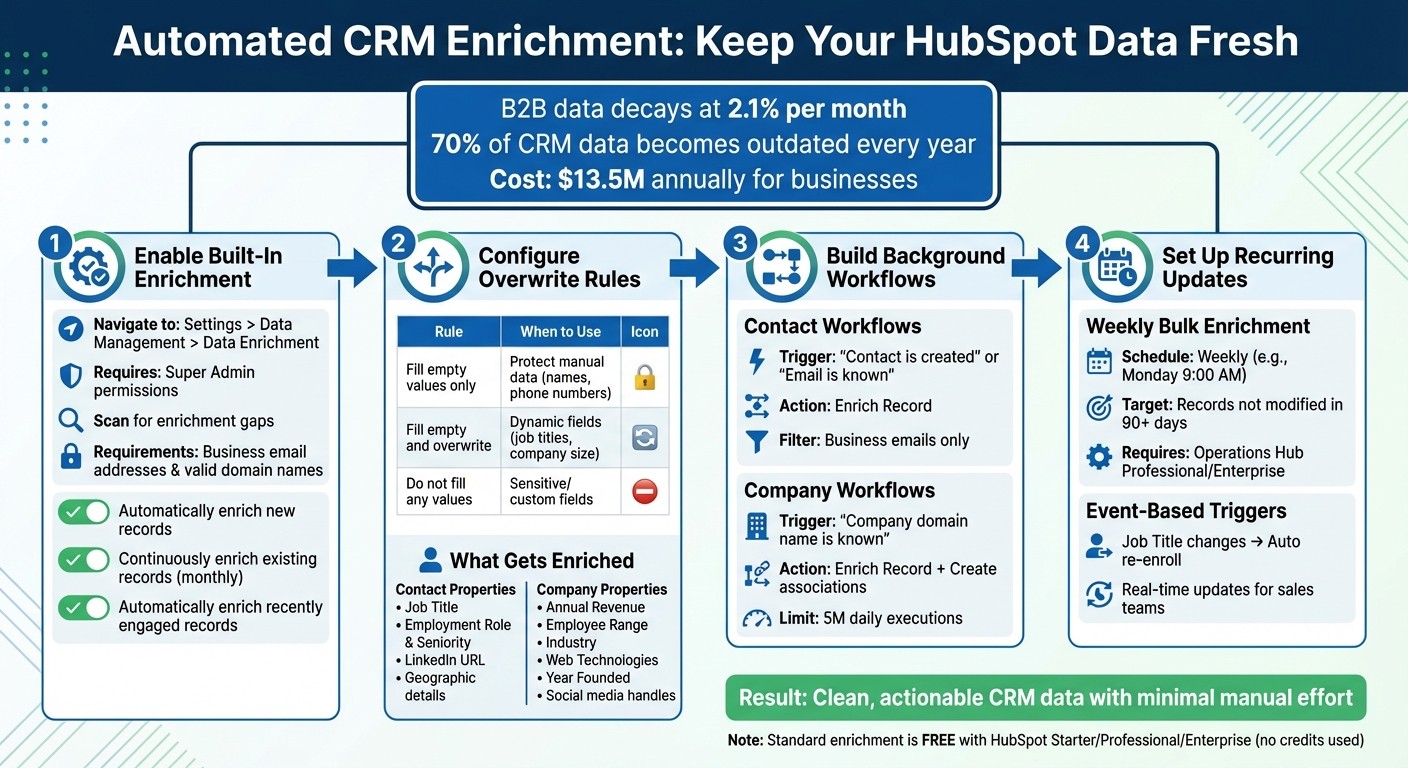
HubSpot CRM Data Enrichment Workflow Setup Guide
Ultimate HubSpot Workflows Tutorial - 2024

How to Enable HubSpot's Built-In Data Enrichment
HubSpot includes native tools that automatically update contact and company records using public records, third-party data, and AI-verified web sources. To activate these features, you need Super Admin permissions or specific Data Enrichment access. You can check this under Settings > Users & Teams > Data Management. Once you have the right permissions, head to Settings > Data Management > Data Enrichment to get started.
To see where your data might need improvement, use the "Scan for enrichment gaps" option in the Data Quality command center. This tool shows your current match rate and identifies records eligible for enrichment. Keep in mind that contacts must have a business email address (emails from domains like Gmail won’t work), and companies need a valid domain name. This scan helps you confirm if your records are ready for enrichment and sets the stage for automating updates.
Automation Toggles for Enrichment
HubSpot offers three automation settings to control when enrichment happens:
Automatically enrich new records: This applies to records added via forms, integrations, or manual entry.
Continuously enrich existing records: Updates records monthly to counter data decay, which happens at about 2.1% per month.
Automatically enrich recently engaged records: Triggers updates when there’s new activity, such as one-to-one emails, meetings, or other engagement.
Mapping and Overwrite Rules
In the Mapping tab, you can assign enriched data to specific HubSpot properties. For each property, you’ll need to choose an overwrite rule:
Fill empty values only: Adds data to blank fields without changing manually entered information.
Fill empty values and overwrite existing values: Updates fields to keep them current, even if they already have data.
Do not fill any values: Disables enrichment for that property.
For instance, you might use "Fill empty values only" for fields like First Name and Last Name to ensure manual corrections aren’t overwritten by automated updates.
"By automating enrichment, you remove that friction and empower teams to focus on selling, serving, and growing - not typing." - CJ Maurer, HubSpot Strategist
What’s Included in HubSpot’s Enrichment?
Standard data enrichment is available for free with HubSpot Starter, Professional, or Enterprise subscriptions, and it doesn’t consume HubSpot Credits. The feature automatically fills in contact properties such as Job Title, Employment Role, Seniority, LinkedIn URL, and geographic details. For companies, it adds firmographic data like Annual Revenue, Employee Range, Industry, Web Technologies, Year Founded, and social media handles.
These built-in tools are a great starting point for automating background workflows, ensuring your CRM data stays accurate and ready to support effective B2B outbound sales.
How to Build Background Workflows for Data Enrichment
Background workflows are a great way to keep your CRM data up-to-date automatically. In HubSpot, you can create workflows tailored to enriching either contacts or companies. Start by heading to Automation > Workflows in your HubSpot account. From there, set up triggers and actions that ensure data enrichment happens at the right time - whether it's when a record is created, when a property changes, or on a set schedule. Below, we’ll walk through how to build workflows for both contacts and companies.
Setting Up Contact Enrichment Workflows
To get started, create a contact-based workflow and define an enrollment trigger. This trigger should identify records that need enrichment. Common triggers include "Contact is created" or "Email is known", which help capture new leads as soon as they enter your system. Once set, add the Enrich Record action to automatically update properties such as Job Title or City using HubSpot's commercial dataset.
Here’s a tip: to save processing power, filter your enrollment criteria to include only contacts with business email addresses. Personal email domains like Gmail or Yahoo won’t qualify for HubSpot’s native enrichment.
For additional insights, include the Data Agent: Fill Smart Property action. Keep in mind that this action uses HubSpot Credits, while the standard enrichment process does not.
Setting Up Company Enrichment Workflows
When enriching company data, create a company-based workflow and use a trigger like "Company domain name is known" or "Create date is less than 1 day ago" to catch new records quickly. Add the Enrich Record action to pull in firmographic details like industry, revenue range, and employee count from HubSpot's dataset.
To streamline your CRM further, include the Create associations action in the same workflow. This action links enriched companies to their related contacts automatically. Be aware, though, that this action has a daily execution limit of 5 million.
Adding AI Summary Actions to Workflows
Once your enrichment steps are complete, consider adding the Summarize record action. This feature generates concise AI-driven summaries of the enriched data. Instead of combing through multiple fields like revenue, employee count, or industry, your sales team will receive a quick, actionable summary. This makes it easier for them to focus on key points during outreach, saving time and simplifying preparation.
Setting Data Overwrite Rules
The final step is to configure your workflow's overwrite rules. These rules dictate how the Enrich Record action handles existing data. For example, you can use "Fill empty values only" to protect manually updated fields. For fields that change often, such as Job Title or Company Size, opt for "Fill empty values and overwrite existing values" to ensure your data stays current. If there are sensitive fields you don’t want enriched at all, select "Do not fill any values".
Here’s a quick breakdown of overwrite rules and when to use them:
Overwrite Rule | Behavior | Best Use Case |
|---|---|---|
Fill empty values only | Updates only blank or null fields | Protecting manually entered data like contact names or direct phone numbers |
Fill empty values and overwrite existing values | Updates blank fields and refreshes existing data | Keeping up with changes in Job Titles or Company Revenue |
Do not fill any values | Skips enrichment for the specified property | Sensitive fields where only internal data is preferred |
How to Set Up Recurring Enrichment for Old Data
Did you know that about 30% of your database becomes outdated every year? That’s a lot of stale information. To keep your data fresh, recurring enrichment ensures older records get the same updates as new ones. HubSpot offers two main approaches for this: scheduled workflows that routinely process older data in batches and event-based triggers that respond immediately when key fields change. These methods can seamlessly integrate with your existing workflows, extending enrichment to legacy records.
Weekly Bulk Enrichment with Lists and Workflows
For refreshing older records in bulk, scheduled workflows are the way to go. Here’s how you can set one up:
Go to Automation > Workflows and create a new workflow from scratch.
Select On a schedule as your enrollment trigger.
Set the frequency to Weekly and choose a specific day and time, like Monday at 9:00 AM.
Define your target segment with filter criteria. For example, you can enroll contacts where "Last modified date is more than 90 days ago". This ensures you’re focusing on records that haven’t been updated in a while.
Once the schedule is set, add the Enrich Record action and activate the workflow. Keep in mind that scheduling workflows at daily or weekly intervals requires Operations Hub Professional or Enterprise. This approach gives you more flexibility compared to HubSpot’s standard monthly enrichment, allowing you to control both the timing and the specific records to target.
Using Event Triggers for Job Changes and Updates
If you prefer real-time updates, event-based triggers are ideal. Start by creating a contact-based workflow:
Use Met filter criteria as the trigger and set it to Job Title is known.
In the Re-enrollment tab, toggle it on and check Job Title. This ensures the contact re-enrolls every time their job title changes.
Add the Enrich Record action so that whenever a job change is detected, the workflow automatically updates the record with the latest professional details.
This same logic can be applied to other fields, such as Lifecycle Stage or Company Domain Name. Event-driven workflows are perfect for keeping sales teams in the loop about important account changes without requiring manual updates. While HubSpot’s continuous enrichment runs on a monthly schedule, these workflows help you capture updates as they happen, ensuring your data stays current.
Using Multithread for Advanced CRM Enrichment
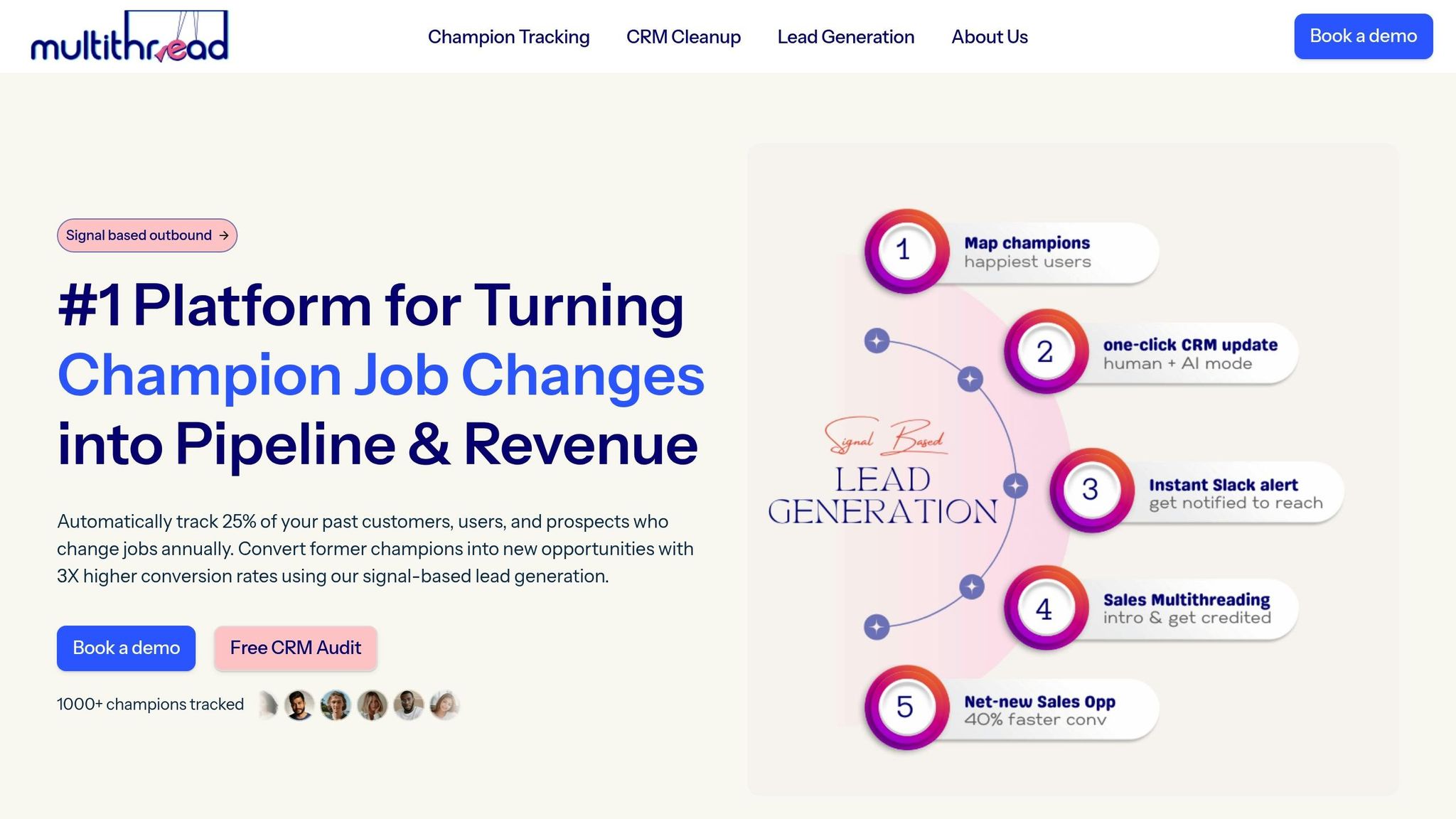
Advanced tools like Multithread take CRM enrichment to the next level, building on the basic automation offered by platforms like HubSpot. While HubSpot's native tools handle routine updates, they often leave deeper issues unresolved - problems like duplicate records, outdated contacts, or incomplete firmographic data. Multithread steps in to address these gaps with a comprehensive approach to CRM cleansing and enrichment. It automates essential processes such as AI-powered deduplication, field standardization, and fixing blank or inaccurate fields.
By integrating Multithread, businesses gain access to clean, enriched account-level firmographics and validated contact data, which are critical for accurate ICP assessments and more effective outreach campaigns.
Here’s a staggering fact: 70% of CRM data becomes outdated every year, costing businesses an average of $13.5 million annually. Multithread not only tackles this challenge but also reduces enrichment costs by up to 15x while improving data accuracy. Vivek Srivastava, Co-founder & COO of Platterhub AI, shared his experience:
"We cut our data enrichment costs by 15x while improving accuracy. The automated research alone saved our team 20 hours per week."
Automating Job Change Tracking and Data Cleansing
One standout feature of Multithread is Champion Tracking, which monitors job changes in real-time. It detects company transitions, validates new employment details, and updates contact records automatically. This enables sales teams to engage at the perfect moment, ensuring their outreach is timely and relevant.
Between 2025 and early 2026, Harish Mohan, CEO of Workplaze, leveraged champion tracking to generate $1M ARR in just six months, achieving a 23% reply rate from job change campaigns. He remarked:
"Champion tracking generated $1M ARR in pipeline in just 6 months. The 23% reply rate from job change campaigns is incredible compared to cold outreach."
The implementation process is seamless. Multithread begins with a discovery call, a detailed CRM audit, and a strategy session to design a custom cleaning plan. From there, the platform deploys advanced AI-powered deduplication and standardization, all while minimizing disruptions to the CRM.
Configuring Workflows for B2B Outbound Sales
For B2B outbound sales, Multithread applies a tiered enrichment strategy. It starts by cleaning and unifying account data, followed by enriching contact details to ensure accuracy. HubSpot workflows can then be configured to trigger personalized outreach whenever a champion switches roles, giving sales teams a timing advantage. Andrea J., VP of Sales at Bright IT Services, highlighted this benefit:
"We stopped chasing dead contacts and started engaging buyers when they switched roles. The timing advantage turned ignored outreach into meaningful calls."
Additionally, Multithread automates the delivery of actionable lead insights directly into HubSpot. This feature alone can save sales teams up to 20 hours per week, freeing them up to focus on closing more deals.
Best Practices for Workflow Management and Data Quality
Once you've set up automated enrichment, keeping your data clean and accurate becomes essential for your CRM to function effectively. Automated workflows are only beneficial if they're well-maintained. Without a clear refresh schedule and checks for duplicates, these processes can backfire - leading to overwritten manual entries, duplicate records, or system overloads at inopportune times.
Setting Refresh Schedules and Update Rules
The key to effective data management is syncing your refresh schedule with how often your data changes. For example, if you're using Operations Hub Professional or Enterprise, you can set workflows to run daily, weekly, or monthly, depending on the priority of the data. For frequently changing fields like job titles, the "Fill empty and overwrite" rule ensures your CRM stays current. On the other hand, for fields that rarely change, like first names, the "Fill empty values only" rule protects manual entries while still enriching incomplete data.
To keep your database up-to-date without using extra credits, enable continuous enrichment. This allows monthly updates for existing records as new data becomes available. Re-enrollment settings are another powerful tool - these let records re-enter workflows whenever they meet the trigger criteria, ensuring updates aren't a one-time thing. Timing settings can further refine your workflows by avoiding weekends or other specific dates, rescheduling actions to the next available window if needed.
Best Practice: Overwrite Rules
Overwrite Rule | Best Used For |
|---|---|
Fill empty values only | Manual fields like contact names or identifiers |
Fill empty and overwrite | Dynamic fields like job titles or company size |
Do not fill any values | Sensitive or highly customized fields |
These practices create a solid foundation for managing duplicates in subsequent workflows.
Auditing and Removing Duplicate Records Before Enrichment
Even with automated scheduling in place, managing duplicate records is critical for maintaining data quality. Duplicate entries can hurt sales efficiency, reducing pipeline performance by 3-5% due to split lead scoring and redundant outreach. By implementing a proactive system, you can reduce the creation of new duplicates by over 90% within a few months.
Start by navigating to Data Management > Data Quality to identify and merge duplicate records before running enrichment workflows. HubSpot's AI-powered duplicate detection tool can help you clean up records effectively. When importing new data, include unique identifiers to ensure existing records are updated rather than duplicated. Additionally, set up monitoring workflows triggered by "Contact is created" to check for existing emails and notify a data steward if issues arise.
A great example of this in action comes from Quick Attach, a construction equipment manufacturer. In January 2022, the company, led by ERP and Database Administrator Josh Didier, introduced automated deduplication workflows. These workflows cleaned and formatted incoming leads within five minutes of entering their CRM. This eliminated duplicate catalog mailings and ensured sales reps weren’t working on the same accounts simultaneously. Didier shared:
"We can check the data, make sure it's a unique person, clean the data, and pass it on to our sales team within five minutes. It definitely has made some cutting edge data progressions for us."
To stay ahead of potential issues, set up performance alerts to catch unusual variations in workflow enrollment, which might signal a logic error. Weekly digests summarizing data issues and changes can also provide a high-level overview, helping you address problems before they impact your entire CRM.
Conclusion
Automated CRM enrichment takes HubSpot beyond being just a contact database - it turns it into a powerful decision-making tool for your sales and marketing teams. By activating built-in enrichment settings, creating workflows to update contact and company data, and scheduling regular updates for older records, you can combat the 2.1% monthly decay rate of B2B data. This ensures your teams always work with up-to-date and accurate information, minimizing wasted efforts and missed opportunities caused by outdated records.
When your data is cleaner and enriched, it improves lead scoring, ensures accurate routing, and supports personalized outreach - all of which drive revenue growth. Considering that 31% of CRM admins identify inaccurate data as a major obstacle to revenue performance, addressing this issue can directly impact your results. Enriched data enables better lead scoring, faster routing to the right sales teams, and tailored outreach that aligns with the expectations of 66% of customers who want brands to understand their unique needs. Instead of spending valuable time researching companies, your sales reps can focus on closing deals.
Michael Welch from HubSpot sums it up perfectly:
"Enrichment improves the reliability of CRM data, which directly influences outbound performance, forecasting, and automation".
The workflows outlined here - from setting overwrite rules to reviewing duplicates before enrichment - help you create automation that doesn’t just work faster but works smarter with reliable data you can depend on.
Automated CRM enrichment is not a one-time fix; it’s an ongoing effort. By enabling continuous enrichment, configuring re-enrollment settings, and setting up monitoring workflows, your HubSpot CRM essentially maintains itself. This means your data stays accurate, your teams remain efficient, and your revenue engine keeps humming along - giving you the confidence to scale and grow.
FAQs
Which HubSpot fields should I allow enrichment to overwrite?
Keeping your CRM data accurate is key to effective sales and marketing. Allowing enrichment to update fields like company industry, employee count, annual revenue, and contact details (such as job title, phone number, and email) ensures that your records remain up-to-date and reliable. This means your team can make informed decisions and maintain better alignment across departments.
How can I enrich older HubSpot records more often than monthly?
You can update older HubSpot records more often by setting up a scheduled workflow with a 'Based on a schedule' enrollment trigger. Adjust the schedule to run at intervals like daily or weekly, rather than sticking to a monthly update. This approach ensures records are re-enrolled consistently, keeping your data accurate and refreshed on a more frequent basis.
Why aren’t some contacts or companies eligible for enrichment?
Contacts or companies might miss out on enrichment when their records lack key details, contain outdated information, or don't align with certain data quality benchmarks. These gaps can disrupt automated systems, making it harder to update or enhance their profiles effectively.