Complete Guide to B2B Email Outreach Automation
Revenue Operations
Feb 18, 2026
Turn cold B2B email from a volume play into precise, personalized outreach that improves deliverability, scales follow-ups, and drives more meetings.

B2B email outreach automation saves time, boosts response rates, and ensures consistent follow-ups. It eliminates repetitive tasks like manual emailing, helping your team focus on closing deals. Here's what you need to know:
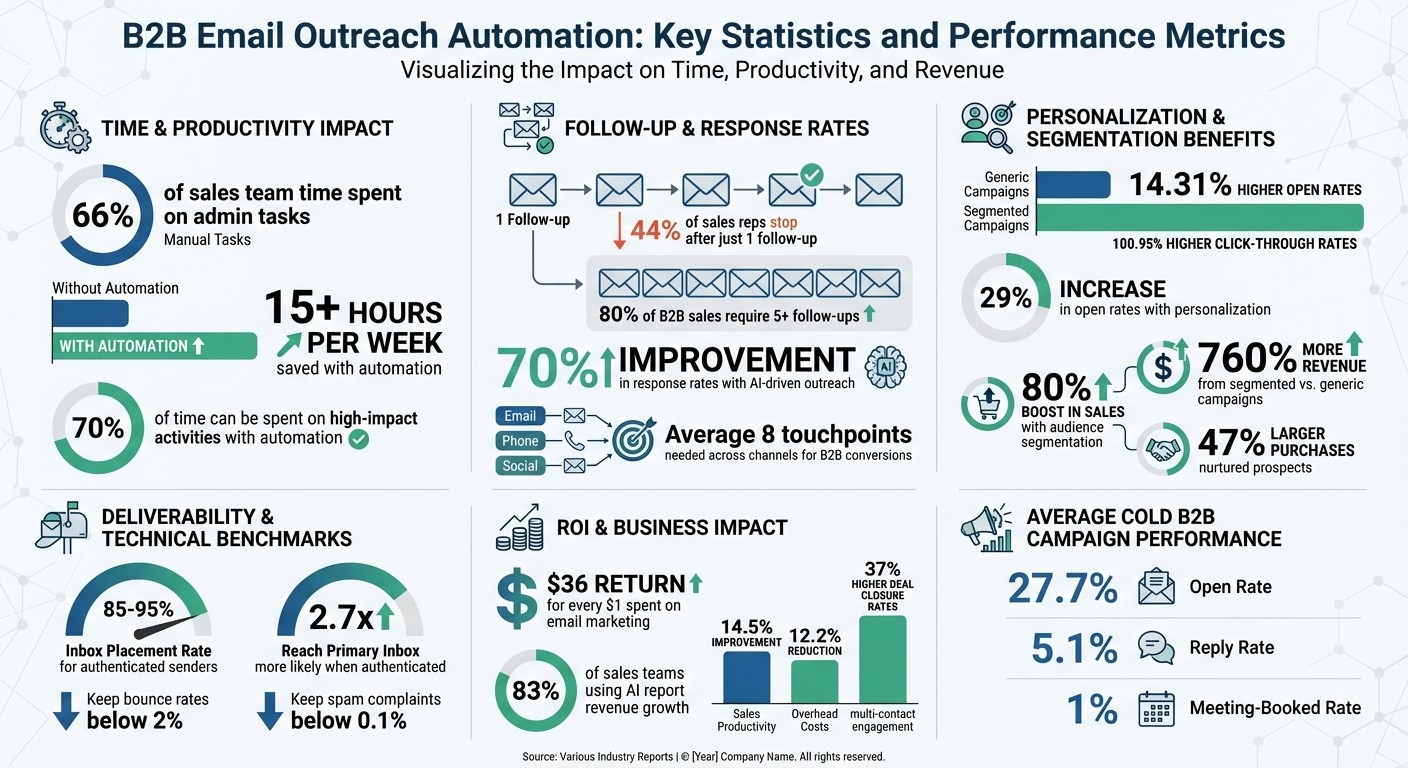
Sales teams spend 66% of their time on admin tasks, leaving less time for revenue-driving activities. Automation solves this by handling repetitive work.
80% of sales require five or more follow-ups, but 44% of reps stop after one. Automation ensures timely, consistent communication.
Teams using AI-driven outreach see a 70% improvement in response rates and save over 15 hours per week.
Proper email domain setup (SPF, DKIM, DMARC) and contact database cleaning are crucial for email deliverability and avoiding spam filters.
Personalization at scale works - segmented campaigns see 14.31% higher open rates and 100.95% higher click-through rates.
This guide covers everything from setting up email automation to creating high-performing campaigns and measuring results. Whether you're scaling outreach or refining your strategy, automation is key to driving better outcomes.
B2B Email Outreach Automation: Key Statistics and Performance Metrics
The Ultimate Guide to Cold Emailing in B2B Sales (Step-by-Step)
Setting Up for Email Outreach Automation
Before you send out any automated emails, you need to set up the technical essentials that can make or break your outreach efforts. Without the right preparation, your emails could end up flagged as spam, never reaching your audience. Two key steps to focus on are authenticating your domain and cleaning your contact database. These are critical for both deliverability and overall performance.
Email Domain Authentication and Legal Compliance
To prove you're a trustworthy sender, you need to implement three essential protocols: SPF, DKIM, and DMARC. Here's a quick breakdown:
SPF acts like a guest list, verifying which IP addresses are allowed to send emails on your behalf.
DKIM adds a digital signature to your emails, ensuring they haven't been altered during delivery.
DMARC ties SPF and DKIM together, letting email providers know how to handle messages that fail authentication - whether to monitor, quarantine, or reject them outright.
Major email providers like Google and Yahoo now require all three protocols if you're sending more than 5,000 emails a day. Authenticated senders enjoy inbox placement rates between 85–95% and are 2.7 times more likely to land in the primary inbox compared to unauthenticated ones. Without these measures, your email campaigns are unlikely to reach your audience.
"If your SDR team lives or dies by cold email, SPF, DKIM, and DMARC aren't an IT checklist - they're revenue infrastructure." – SalesHive
To get started, add a single SPF TXT record to your DNS settings - having multiple records can cause failures. Use 2048-bit DKIM keys and rotate them annually. For DMARC, start with a monitoring policy (p=none) to gather data, then gradually move to stricter policies like quarantine and reject over 60–120 days. Many B2B teams also create subdomains (e.g., outbound.company.com) to safeguard their primary domain's reputation.
Once your authentication is in place, make sure you comply with regional email laws. In the U.S., CAN-SPAM allows cold B2B emails without prior consent, but you must include a valid physical address, honest subject lines, and an easy way to unsubscribe. Fines for violations can reach up to $51,744 per email. For example, Verkada Inc. faced a record $2.95 million fine in 2024 for failing to provide unsubscribe options and a proper address.
If you're targeting prospects in the EU, GDPR applies, and you'll likely rely on "Legitimate Interest", which requires documented justification for your outreach. In Canada, CASL demands either express or implied consent before sending emails. Keep spam complaint rates below 0.1%, as providers like Google and Yahoo will block you if rates exceed 0.3%. Tools like Google Postmaster can help you monitor your sender reputation in real time.
Once you've handled these technical and legal requirements, it's time to focus on your contact list.
Cleaning and Organizing Your Contact Database
An outdated or inaccurate contact list can quickly damage your sender reputation. B2B data naturally declines by about 22.5% each year due to job changes, company mergers, and domain expirations. Sending emails to invalid addresses not only wastes effort but also risks triggering spam filters, which can hurt your deliverability for months.
To maintain a healthy list, aim to keep your hard bounce rates below 1% and total bounce rates under 3–5%. Use email verification tools that check for:
Syntax errors to ensure proper formatting.
Domain and MX records to confirm the domain exists.
SMTP handshakes to verify active mailboxes.
Human-verified contacts typically have about 95% accuracy, compared to 60% for machine-only verification.
Avoid using role-based addresses like info@ or sales@, as they rarely connect with decision-makers and tend to generate higher complaint rates. Be cautious with catch-all domains (which accept all emails) by testing them in small batches rather than including them in large campaigns. Also, implement a "sunset policy" for inactive contacts: if someone hasn’t engaged within 90–180 days, try a brief re-engagement campaign before removing them from your list.
Organize your database by segmenting contacts based on firmographics (e.g., company size, industry), personas (e.g., role, seniority), and intent signals (e.g., hiring trends, tech adoption). Standardize data formatting - convert names to Title Case and phone numbers to E.164 format - to ensure smooth personalization and click-to-dial functionality. Use email addresses as the primary identifier for deduplication, but also apply fuzzy matching for combinations like "Name + Company" to catch duplicates.
"Email deliverability is a feedback loop for whether you're sending the right content to the right contacts at the right time." – HubSpot
If you're launching a new domain or IP, take time to warm it up. Gradually increase your email volume over 30–60 days to build a positive reputation with Internet Service Providers (ISPs). A strong sender reputation will significantly improve your inbox placement over time.
With your domain authenticated and your contact list in top shape, you're ready to create email campaigns that engage your audience and drive results.
Building High-Performance Email Campaigns
Once your domain is authenticated and your contact list is polished, it’s time to create campaigns that deliver measurable results. The days of mass emails are fading, replaced by targeted, meaningful outreach. This shift isn’t just a trend - companies using audience segmentation have seen up to an 80% boost in sales, while segmented campaigns achieve a 14.31% higher open rate and a 100.95% jump in click-through rates compared to non-segmented ones. The secret? Tailoring your message to match where prospects are in their buying journey and tackling their specific challenges.
Audience Segmentation for Smarter Targeting
Segmentation isn’t just about basic demographics anymore. You’ll need to layer in firmographic details like industry, company size, and revenue, along with behavioral signals such as email opens, visits to your pricing page, or downloads of your content. Add technographic insights (like their current software stack) and psychographic elements like decision-making preferences.
Dynamic segmentation takes things further, updating in real time based on a prospect’s actions. For instance, if someone visits your pricing page but doesn’t convert, they can automatically shift into a segment that receives case studies or ROI calculators. Meanwhile, a whitepaper download might indicate early-stage interest, calling for more educational materials.
Your outreach should align with the prospect’s lifecycle stage. For example:
Leads benefit from educational content and blog subscriptions.
Marketing Qualified Leads (MQLs) are ready for demo requests and case studies.
Sales Qualified Leads (SQLs) need tailored proposals and ROI discussions.
Account-Based Marketing (ABM) strategies that leverage intent data can increase pipeline conversion rates by 14%, and engaging multiple contacts within a single account makes deals 37% more likely to close.
"Behaviors that generate high scores - site visits, email opens, content downloads, forward detection, email clicks - are reliable proof that specific customers should be targeted for follow-up."
– Jeffrey Goldsmith, Fractional CMO
Stick to the "3-Round Rule": limit email-only outreach to three attempts before switching to other channels like LinkedIn or phone calls. With 61% of B2B buyers now preferring a rep-free buying experience, every touchpoint must add value and be perfectly timed.
With well-defined segments, you can craft messages that resonate with each prospect’s stage in the buying process.
Writing Personalized Email Sequences
Personalization is key, and buyers notice. 90% of buyers say personalization influences their purchase decisions. Customized email templates perform better too, delivering 10% higher open rates and doubling reply rates compared to standard benchmarks. The challenge? Scaling this level of personalization without eating up hours for every email.
Start with a subject line that’s 4–5 words long, ideally using the recipient’s name to make it feel conversational. Keep the email body concise:
Open with a specific insight about the recipient’s account.
Highlight a key pain point.
Present your solution briefly.
Offer a proof point.
End with one clear call to action.
Keep the total word count under 150 words, ensuring it can be read in under 30 seconds.
"Ensure your emails can be read within 30 seconds. Mine are never longer than three lines per email."
– Bria Caldwell, Commercial Account Executive, Outreach
Timing matters too. Send emails on Tuesday through Thursday, between 9–10 AM or 7–10 PM in the recipient’s local time zone. AI-driven send-time optimization can boost open rates by 35% to 50% compared to sending in bulk. Space your follow-ups 2 to 4 days apart to maintain visibility without becoming overbearing.
Make sure your emails are mobile-friendly. Mobile-optimized layouts lead to 24% higher open rates and 15% better click-through rates. Use short paragraphs, clear calls to action, and simple formatting that works well on smaller screens.
Build behavioral branches into your email sequences. For example, if a recipient opens an email but doesn’t click, follow up with a case study. If they click a pricing link, move them straight to a sales-focused conversation. On average, B2B conversions take about 8 touchpoints across multiple channels, so coordinating your email efforts with other outreach methods is essential.
"Ditch the jargon and let your genuine voice come through."
– Steven Monterrey, Commercial Account Executive, Outreach
Focus your copy on the prospect’s needs rather than your company’s features. Avoid phrases like "I/We" and directly address their challenges and goals. For C-suite executives, emphasize strategic outcomes and business value. For technical evaluators, provide detailed specs and proof points to build trust and credibility.
Using Multithread for Email Automation
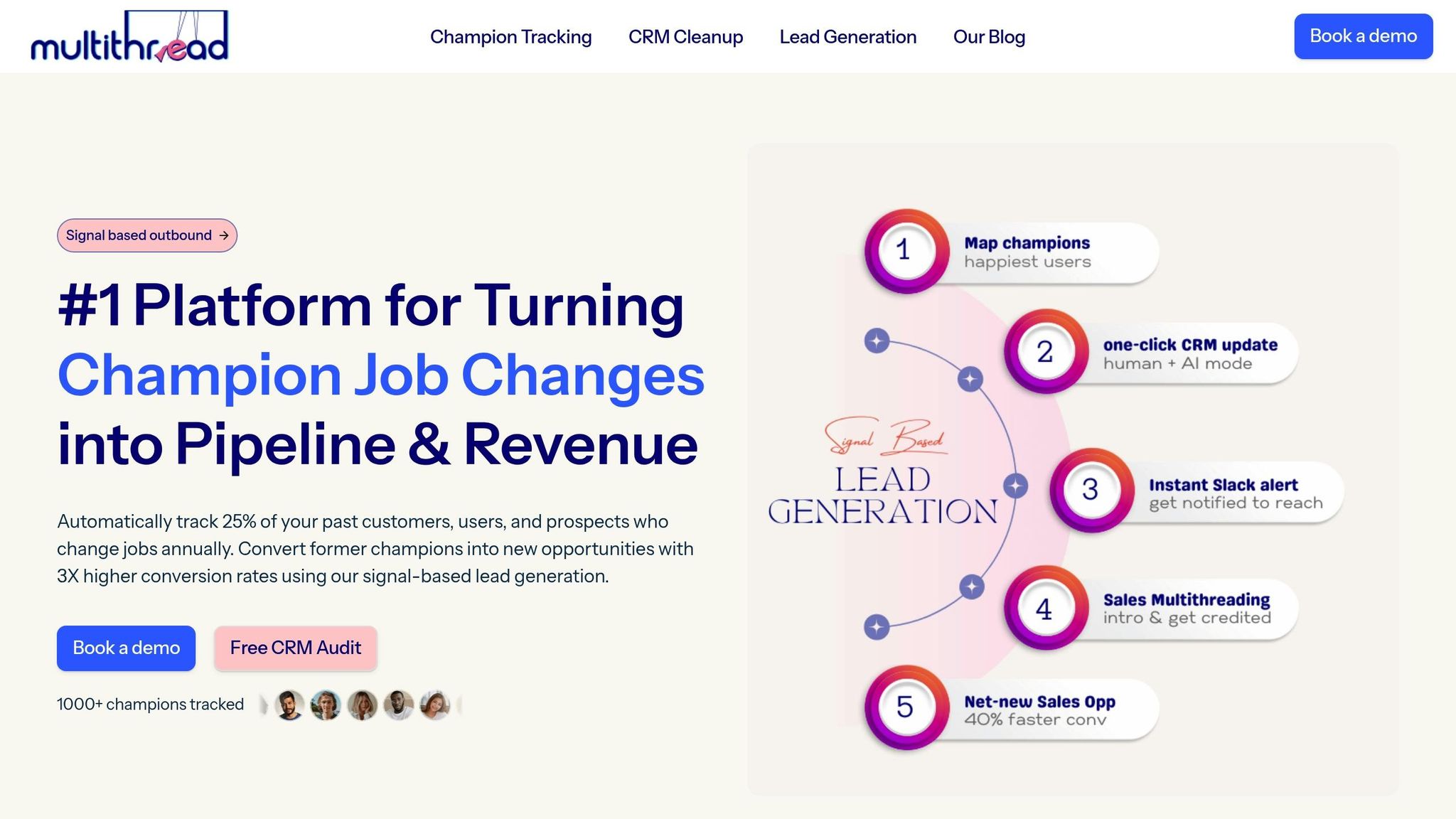
Multithread works with HubSpot CRM to simplify email and LinkedIn outreach, eliminating the hassle of manually tracking activities across platforms. By aligning email sequences with LinkedIn interactions, it ensures your prospects receive consistent, coordinated messages across channels. This integration automates repetitive tasks, freeing up your team's time for higher-value activities.
The platform is designed to streamline email campaigns by mapping out your sales processes. Tasks like sending initial emails, assigning leads, and following up are all automated. Plus, its native CRM integration tracks every email open, click, and reply in real time. This gives your sales team instant visibility into where each prospect stands, without needing to juggle multiple tools or dashboards.
Connecting Your CRM for Multi-Channel Outreach
Multithread takes personalized email strategies to the next level by ensuring consistency across multiple channels. When linked with HubSpot, it creates a seamless flow of data between systems. For example, if a prospect opens an email but doesn’t respond, Multithread can automatically schedule a LinkedIn connection request or even set up a follow-up call. Every interaction - whether it’s clicking an email, viewing a LinkedIn profile, or visiting your pricing page - syncs with your CRM in real time.
Given that 72% of B2B marketers already use automation in their email campaigns, tools like Multithread play a crucial role in aligning these touchpoints for better results. By integrating data and automating responses, it ensures your outreach remains timely and relevant.
Automated Segmentation and Nurturing
Multithread's segmentation capabilities go far beyond simple filtering. It categorizes contacts based on factors like industry, company size, behavioral patterns, and where they are in the buyer journey. This enables highly targeted messaging across channels. For example, if someone downloads a whitepaper, they’re automatically added to an educational sequence. If they visit your pricing page, they’re shifted to a sales-focused track featuring case studies and ROI calculators.
The platform uses trigger-based workflows with if/then logic to adjust messaging dynamically. For instance, if a prospect repeatedly engages but doesn’t click, the next call-to-action can be modified to better suit their behavior. AI-powered personalization further boosts response rates by incorporating insights like company news or recent funding announcements. Meanwhile, Multithread continuously runs A/B tests on subject lines and calls to action, refining campaigns with data-driven adjustments.
Since 80% of B2B sales require five or more follow-ups, this automated approach ensures no prospect falls through the cracks, helping your team focus on closing deals efficiently.
Measuring and Improving Campaign Results
Once your campaigns are up and running, measuring their performance is key to keeping them effective. By tracking the right metrics, you can move from guessing to making informed decisions. Think of your email funnel as a journey: Delivered → Opened → Replied → Positive Reply → Meeting Booked → Opportunity Created. Each step helps you spot where engagement drops off and where prospects are sticking around.
It’s important to separate diagnostic metrics from success metrics. For example, open rates and click-through rates act like health indicators - they show if your emails are reaching inboxes and sparking interest, but they’re not the end goal. As SalesHive puts it:
"Treat open rate like blood pressure: it tells you whether the system is healthy, but it's not the scoreboard".
The real game-changers are positive replies and meetings booked. On average, cold B2B campaigns see a 27.7% open rate, a 5.1% reply rate, and a 1% meeting-booked rate. If your open rates are solid but replies are lagging, it might mean your subject lines are working, but your message or offer isn’t hitting the mark.
Running A/B Tests to Refine Your Campaigns
A/B testing is a straightforward way to figure out what’s working and what’s not. The trick is to test one variable at a time - like a subject line or a call-to-action - so you can pinpoint what’s driving the change. Avoid testing multiple elements at once, as it muddies the results. For reliable insights, test each variation on at least 100 contacts.
Tailor your tests to your goals. If you’re testing subject lines, focus on open rates. For body copy, look at reply rates. And for CTAs, track click-through rates. Customized email templates, for instance, tend to perform better, with 10% higher open rates and more than double the reply rates compared to standard benchmarks. Since follow-up emails often lead to the most meetings booked, it’s smart to prioritize testing those later touches instead of putting all your energy into the first email.
While A/B testing fine-tunes specific elements, keeping an eye on overall performance ensures your campaigns stay on track.
Monitoring Performance Metrics
Reports from tools like Multithread emphasize the metrics that matter for driving revenue. Focus on the positive reply rate instead of just raw reply numbers - filtering out "not interested" responses gives a clearer picture of how well your message resonates. Keep bounce rates below 2% to maintain your sender reputation and avoid deliverability issues. A sudden dip in open rates or a spike in bounces could point to technical problems, like a damaged domain reputation or emails triggering spam filters.
Make it a habit to review your funnel weekly to catch any changes early. For example, high open rates paired with low replies might mean your subject lines are grabbing attention, but your value proposition isn’t landing. Segmented campaigns - those tailored to specific industries or job titles - can generate up to 760% more revenue than generic ones. Tracking performance by segment can help you figure out which groups are most responsive. Regular monitoring ensures no opportunity slips through the cracks while your team focuses on closing deals.
Conclusion
From verifying your domain to refining personalized outreach, this guide has shown how automation reshapes B2B outreach. By automating tasks that used to take over 15 hours a week, your team can focus on meaningful, revenue-generating conversations. With email marketing delivering an average ROI of $36 for every $1 spent, the potential is clear. Plus, 83% of sales teams using AI have reported revenue growth.
Personalization at scale isn’t just a buzzword - it works. It can increase open rates by 29% and lead to nurtured prospects making 47% larger purchases. Automation steps in to handle the repetitive work, like tracking behaviors, triggering intent-based sequences, and syncing touchpoints across email and LinkedIn. This frees up your team to spend up to 70% of their time on high-impact activities.
Chaviva Gordon-Bennett of monday campaigns sums it up perfectly:
"Success is no longer about volume. It's about turning generic outreach into relevant, well-timed conversations that move prospects toward meetings and pipeline".
This evolution from mass outreach to targeted engagement is what sets top-performing teams apart.
Tools like Multithread take this a step further by connecting your CRM with multi-channel outreach. It automates lead segmentation and engages entire buying groups, driving a 37% increase in deal closure rates. By managing technical setups, maintaining clean data, and orchestrating sequences, Multithread allows your team to focus on building strong relationships instead of wrestling with spreadsheets and manual processes.
The key is finding the right balance between automation and a personal touch. Let automation handle routine follow-ups and data organization, while your team focuses on personalized interactions for high-value opportunities. This approach can cut overhead by 12.2% and improve sales productivity by 14.5%, turning your outreach efforts into a true growth engine.
FAQs
How do I know if my emails are landing in spam?
To make sure your emails aren't ending up in spam, keep a close eye on deliverability metrics, review open rates, and assess your sender reputation. Watch for red flags like high bounce rates or instances of hitting spam traps. It's also a good idea to use tools or follow established practices to evaluate your email content and ensure it aligns with industry best practices.
What’s the safest way to automate follow-ups without annoying prospects?
The best way to approach email outreach is by using a thoughtfully structured email cadence. Balance persistence with a personal touch by tailoring your follow-ups to the recipient's behavior. Space your messages out wisely to avoid overwhelming them. This keeps your communication respectful and relevant, making it more likely they'll engage with your outreach.
Which metrics best predict meetings booked from cold email?
Key metrics to focus on are reply rates, especially from the first email, as a significant 58% of replies are generated from that initial outreach. On top of that, well-structured follow-up sequences play a vital role, accounting for 42% of total replies. This underscores how crafting a strong first email and maintaining steady, thoughtful follow-ups can significantly boost the chances of securing booked meetings.