
How to Write B2B Email Subject Lines That Convert
Revenue Operations
Feb 25, 2026
Short, personalized B2B subject lines that spark curiosity and show value. Use numbers, urgency, and A/B tests to boost opens, clicks, and replies.
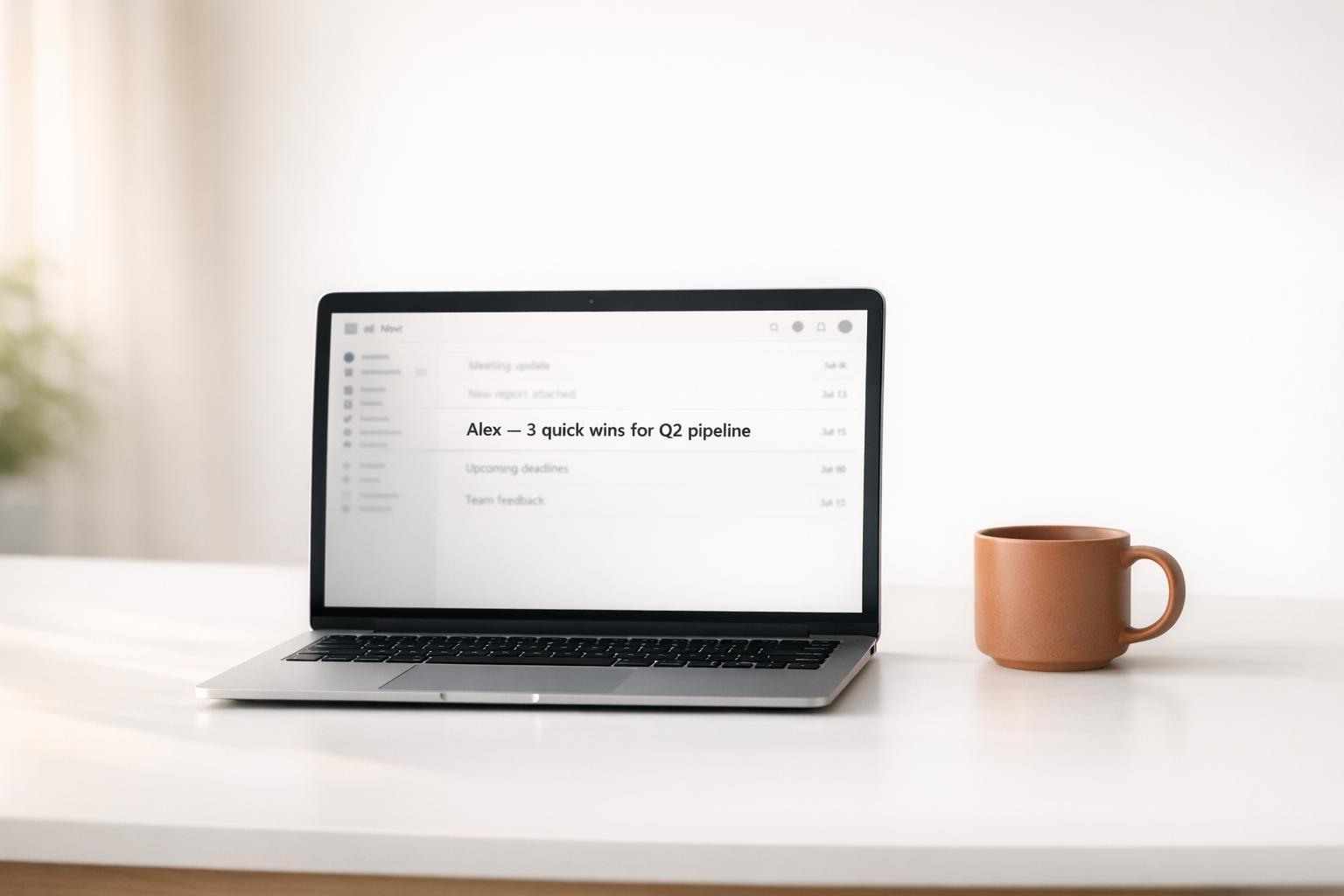
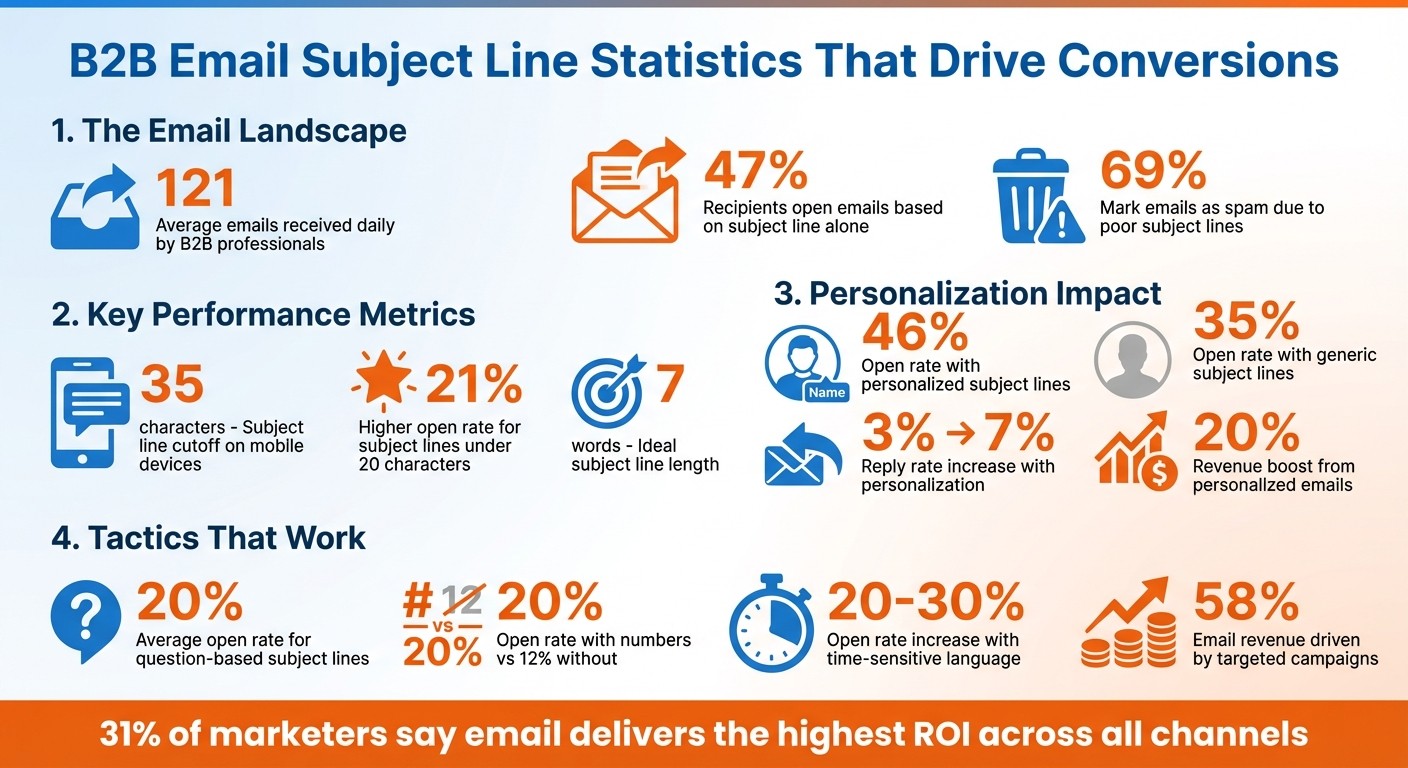
Your subject line is the gateway to your email’s success. In B2B marketing, where professionals get an average of 121 emails daily, crafting a standout subject line is critical. Why? Because 47% of recipients open emails based solely on the subject line, while 69% mark emails as spam for the same reason. A strong subject line increases open rates, drives action, and can even lead to closed deals.
Here’s what works:
Keep it short: Subject lines under 50 characters perform better on mobile.
Personalize: Emails with tailored subject lines see up to a 46% open rate.
Spark curiosity: Questions or intriguing statements boost engagement but must deliver on their promise.
Use numbers and action verbs: These grab attention and highlight specific benefits.
Create urgency: Time-sensitive language can increase open rates by up to 30%.
Test and refine your subject lines through A/B testing, focusing on metrics like open and reply rates. Tools like HubSpot can help track performance and optimize campaigns. Nail your subject line, and you’re one step closer to meaningful engagement and conversions.
B2B Email Subject Line Statistics and Best Practices
How to Write Subject Lines That Generate B2B Leads
Best Practices for Writing B2B Email Subject Lines
Crafting subject lines that grab attention and get opened is all about keeping things brief, relevant, and authentic. These strategies can help you cut through the clutter of crowded inboxes and spark meaningful engagement.
Keep It Short and Mobile-Friendly
Your subject line needs to shine on a smartphone screen. Most phones chop off subject lines at around 35 characters, so aim for 30 to 50 characters. If you have to go longer, make sure the most important details are up front, where they’ll still be visible.
Data backs this up: subject lines with fewer than 20 characters see a 21% higher open rate. The ideal word count? Seven words. For example, in December 2022, Eric Severstad from Weidert Group tested a short, benefit-focused subject line - "How to extend tap life 400%" - and achieved a 42% open rate.
"Your subject line is only the front door. It doesn't need flashing lights and a buzzer to ensure folks come inside."
– Kit Fox, Director of Revenue Marketing Strategy, Altitude Marketing
To keep it concise, ditch filler words like "newsletter" or "update", and avoid overloading with punctuation or using all-caps. Action verbs like "Increase", "Join," or "Discover" can make your subject line pop. A mobile-friendly subject line not only avoids being cut off but also sets the stage for adding a personal touch.
Use Personalization for Better Relevance
Once your subject line is concise, adding a personal touch can take it to the next level. Personalization goes beyond just popping in a first name. Emails with personalized subject lines see a 46% open rate, compared to 35% for generic ones. They can also boost reply rates from 3% to 7%, and marketers report a 20% revenue boost when using personalized emails.
The best personalization includes details like the recipient’s company, industry, or recent activity. For instance, subject lines like "Collaboration with {Company Name}" have achieved open rates of 47.8% and response rates of 5.24%.
"Investing in personalization isn't just an option. It's non-negotiable. Personalized subject lines don't just entice opens. They make recipients far more inclined to engage, respond, and take the next step."
– Kiril Potapkin, Head of Content, Belkins
Go beyond basic tokens like {{firstname}}. Use variables such as {{painPoint}}, {{competitor}}, or {{Objective}} to make your email feel genuinely tailored. Even referencing a specific article or project your prospect recently shared can show you’ve done your homework. When detailed information isn’t available, simply using "you" and "your" can make the message feel more direct and personal. Just don’t overdo it or use spammy words like "Free" or "Act Now".
Create Curiosity Without Misleading
Subject lines that spark curiosity can drive engagement - if they deliver on their promise. For example, subject lines phrased as questions average a 20% open rate, and when paired with personalization, that number can climb to 46%. The secret? Tease enough to intrigue without resorting to clickbait.
"There's a clear shift toward clarity and curiosity over hype. Personalized subject lines that pose a question seem to spark interest and invite interaction, likely because they are authentic and suggest the email contains an answer or insight the reader may find valuable."
– Taisia Mendel, Senior Content Strategist, Belkins
In May 2024, Kit Fox tested B2B nurture email subject lines. One version, "Market Research: How to Spy on Your Competitors for (Mostly) Free," outperformed a simpler version, "How to Spy on Your Competitors for (Mostly) Free," with a 28.82% open rate - a 6.5% improvement. Highlighting the topic upfront made the subject line both clear and intriguing.
The key is to build curiosity while staying truthful. If your subject line promises a solution, your email needs to deliver. This approach not only builds trust but also helps maintain your sender reputation, which is crucial for long-term success.
These strategies lay a solid foundation for testing and refining your subject lines further.
Advanced Techniques for Better Subject Lines
Once you've nailed the basics, these advanced strategies can help you craft subject lines that truly connect with your audience. By tapping into psychological triggers and using precise language, you can significantly boost your open and response rates. Just remember to steer clear of spam-trigger words, over-the-top punctuation, and shouting in ALL CAPS.
Use the C.U.R.V.E. Method
The C.U.R.V.E. framework is built around five key elements: Curiosity, Urgency, Relevance, Value, and Emotion. The most effective subject lines combine at least two of these elements to draw attention and spark action.
Curiosity makes readers want to know more by hinting at something intriguing.
Urgency adds time pressure, encouraging immediate action.
Relevance targets specific concerns your audience cares about, such as reducing customer churn or improving sales pipelines.
Value promises a clear benefit.
Emotion taps into feelings like excitement, exclusivity, or surprise.
For example, Cognism tested the subject line "{FIRST NAME}'s Invitation" for B2B event services. By combining personalization with a sense of exclusivity, they achieved a 55.4% open rate and a 10.18% response rate. Similarly, Focus Digital used "How {Company Name} can {Desired Result}" to focus on relevance and value, leading to a 40.2% open rate.
"Treat your subject line like ad copy for a meeting: one clear promise, one believable detail, and just enough curiosity to earn the open." – SalesHive
To make your subject lines even more effective, place the most compelling words at the beginning so they're visible on mobile screens. Adding brackets, like "[GUIDE]" or "[Webinar]", can also highlight key details.
Add Numbers and Action Verbs
Numbers and action verbs are simple yet powerful tools for making subject lines stand out. Numbers catch the eye and add a sense of specificity. Emails with numbers in their subject lines see a 20% open rate, compared to 12% for those without. If you include currency values, open rates can jump to 29%.
Pairing numbers with action verbs like "Increase", "Cut", or "Unlock" signals clear benefits. For example, "Increase sales by 25%" or "Cut costs by 15% in 30 days" immediately communicates value.
Here’s a winning formula: [Number or Trigger Word] + [Specific Benefit] + [Timeframe or Qualifier]. Examples include "Cut onboarding time by 50%" or "3 ideas to improve your graphic design". You can also frame it as a question: "Ready to get 30% more clicks?".
However, avoid pairing numbers with spammy terms like "Free" or "Earn However, avoid pairing numbers with spammy terms like "Free" or "Earn $" to keep your emails out of junk folders [10][1].quot; to keep your emails out of junk folders.
Use Time-Sensitive Phrases for Urgency
Urgency plays on the fear of missing out (FOMO), which can be a powerful motivator. Studies show that time-sensitive language can boost open rates by 20% to 30%.
The key to urgency is authenticity. It should be based on real deadlines, actual inventory limits, or genuine time-sensitive offers. Instead of vague phrases like "Hurry, ends soon", opt for something more specific, like "Offer ends at 11:59 PM tonight".
"Ethical urgency is based on real constraints - actual deadlines, genuine inventory limits, or authentic time-sensitive offers." – Muhammed Tüfekyapan, Founder, Growth Suite
To amplify urgency, front-load action verbs like "Claim", "Secure", or "Reserve." You can also build momentum with countdowns, such as "24 hours left" followed by "2 hours left". Personalize these messages to make them feel helpful rather than pushy: "Your exclusive discount expires in 6 hours".
But don’t overdo it. Overusing urgency with fake deadlines or constant "last chance" messages can lead to urgency fatigue, where your audience starts ignoring these calls to action.
Testing and Improving B2B Subject Lines
Fine-tune your subject lines using A/B testing and data analysis to move away from guesswork and uncover what resonates with your audience. Testing helps determine whether your recipients prefer clear, value-driven messages or curiosity-inducing hooks.
Run A/B Tests to Find What Works
A/B testing involves dividing your email list into two random groups, each receiving a different subject line. The version with the better open rate is then sent to the rest of your audience. To get meaningful results, focus on testing one variable at a time - such as length, personalization, tone, or urgency. Testing multiple changes at once makes it difficult to identify what actually influenced the outcome.
For instance, a 2024 Focus Digital study showed that a simple, personalized subject line like "Hi {First Name}" achieved a 41.9% open rate in cold outreach campaigns, outperforming more complex alternatives. Similarly, copywriter Laura Belgray tested a curiosity-driven subject line against a straightforward one and found the curiosity-based version nearly doubled the open rate. These examples highlight the importance of tailoring your tests to your specific audience - what works for one group might fail with another.
"A/B testing your email subject lines is all about swapping guesswork for knowledge... those numbers tell you a story. They tell you if your subscribers are more into catchy and creative or if they like it straight-up and no-nonsense." – Shahnawaz Mohammed, SendX
To ensure accurate results, you need a large enough sample size. A good rule of thumb is a 50/50 split with at least 1,000 recipients. Decide on a clear success metric - open rate, click rate, or reply rate - and let the test run for 24 to 48 hours before analyzing the data. This approach provides the confidence to pick a winner and refine your subject lines further.
Use HubSpot Analytics for Performance Insights
Once your emails are sent, HubSpot's analytics tools can help you dive deeper into performance metrics. Start with open rates, then move on to click-through and reply rates for a fuller picture. For B2B marketers, tracking mobile open rates is especially important since subject lines often get cut off on smaller screens.
But open rates are just the start. Click-through rate (CTR) reveals whether your subject line aligns with the email's content - high opens but low clicks may indicate overpromising. For sales-focused emails, reply rate is a key metric, showing whether your subject line sparked meaningful engagement. If you're using HubSpot Marketing Hub Enterprise, you can even track revenue attribution to see how email campaigns contribute to sales.
HubSpot's "Compare" feature lets you analyze up to 10 emails side by side to identify trends in subject line performance. Use the "Opens by email client" report to see if specific formats, like emojis or shorter lengths, perform better on platforms like Gmail versus Outlook. Additionally, the "Engagement over time" report helps you understand when recipients are most likely to open your emails, giving you insights to optimize both your subject lines and send times.
"Many modern marketers shrug this off as a vanity metric compared to things like click-through rate (CTR) and ROI, but let's not forget - none of these are possible if your email doesn't even get opened." – Erica Santiago, HubSpot Blog
Keep a record of your findings to uncover long-term patterns. Over time, you'll learn whether your audience responds better to direct value, curiosity, or personalization. This ongoing process ensures every email becomes a stepping stone for sharper, more effective campaigns.
How Multithread Can Support Your B2B Email Campaigns
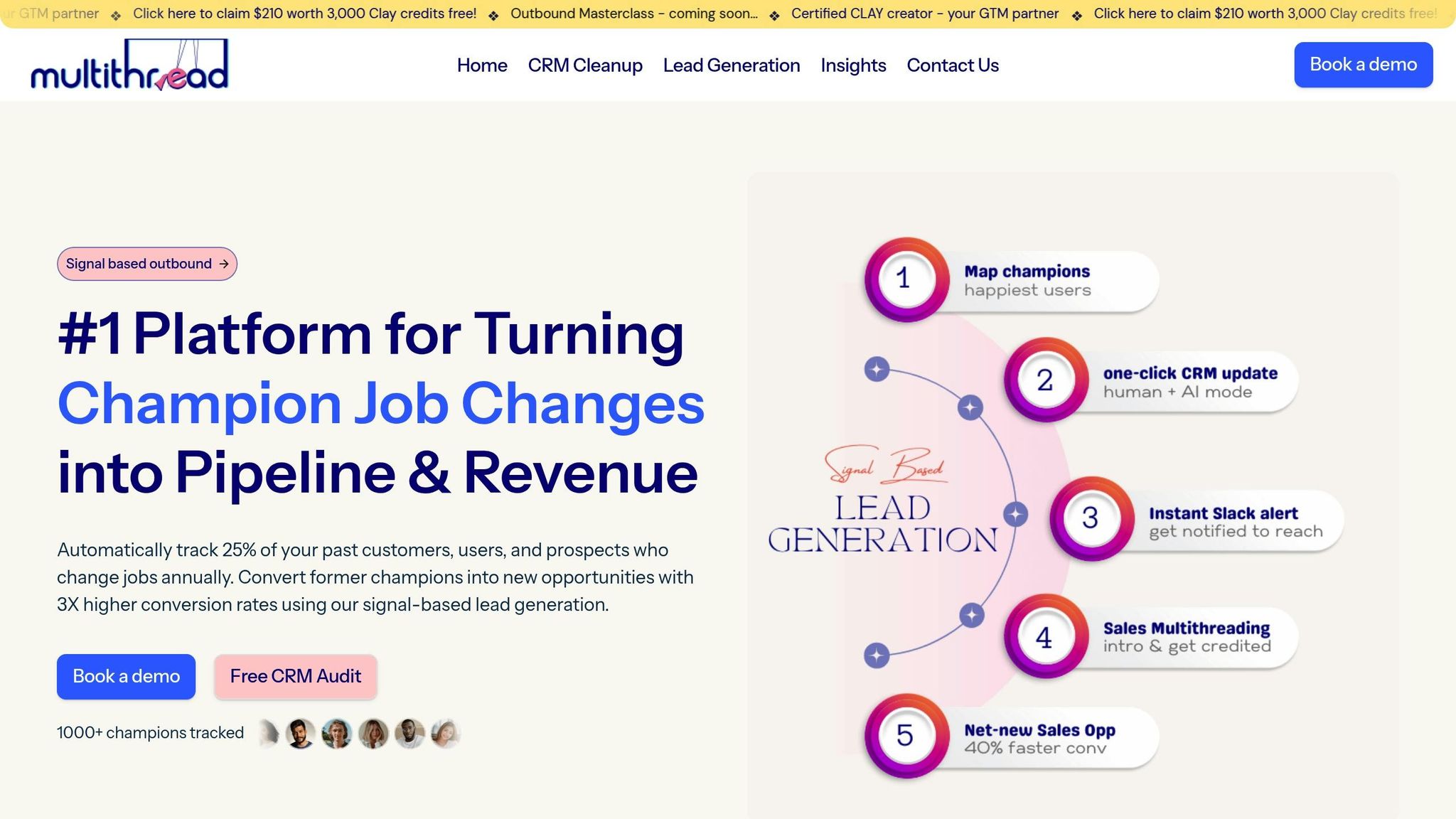
Creating high-converting subject lines is important, but their real power comes to life when paired with a strong CRM system and smart strategies. Clean data, precise audience segmentation, and perfectly timed outreach turn ordinary email blasts into conversion-driving tools. Let’s dive into how Multithread combines advanced CRM features with email best practices to boost your campaign performance.
Improve Segmentation and Personalization
Multithread enhances your HubSpot CRM data by cleaning and enriching it. This means ensuring records are complete, titles are up-to-date, and formats are standardized. These improvements enable advanced segmentation based on lifecycle stages, behavioral triggers (like downloads or site visits), and firmographic details such as industry or company size. With this level of detail, you can craft subject lines that feel personal, referencing recent company achievements like funding rounds, product launches, or hiring activity.
For example, a nurture email with a personalized, question-driven subject line like “{{FirstName}}, who’s buying right now?” achieved an impressive 52% open rate and a 24% click-through rate. Considering that 31% of marketers say email delivers the highest impact on revenue across all channels, getting segmentation right is no longer a luxury - it’s a necessity.
Better Campaign Timing with Job Tracking
Once you’ve nailed segmentation, timing becomes the next big factor. Multithread’s Job Tracking feature helps you reach prospects at the perfect moment by identifying when key contacts change roles. A well-timed subject line referencing a prospect’s new job or promotion grabs their attention because it’s both relevant and timely. These “Champion Job Change” signals are golden opportunities to connect when decision-makers are open to exploring new solutions.
This feature also supports a "multithreading" approach, where an email is sent to a primary stakeholder while CCing other decision-makers. This strategy keeps communication clear and avoids the confusion of “who’s supposed to reply”. To make this work effectively, call out the specific person you want to respond to in the email - this prevents the diffusion of responsibility that can stall deals.
Scale Campaigns with Growth-as-a-Service
Multithread’s Growth-as-a-Service acts as an extension of your team, handling everything from strategy to execution. This is particularly valuable since 62% of marketing teams need at least two weeks to produce a single email. Automated workflows streamline the process, allowing you to scale personalized campaigns across thousands of contacts without needing to add more staff.
But it doesn’t stop at automation. Multithread goes beyond basic AI text generation by leveraging machine learning to test, analyze, and refine subject lines in real time. These systems evaluate thousands of data points to predict which subject line variations are most likely to succeed - before you even hit send. Given that targeted emails drive about 58% of all email revenue, this level of precision has a direct impact on your results.
Conclusion: Writing Subject Lines That Get Results
This guide has shared strategies to help you craft subject lines that grab attention and drive results. Let’s recap the essentials.
Key Takeaways
Strong subject lines hinge on clarity, relevance, and value. Keep them under 50 characters so they display properly on mobile devices. Go beyond using just a first name for personalization - mention specific pain points, company details, or recent activities to make your message feel tailored.
Value is non-negotiable. B2B decision-makers skim their inboxes for messages that matter to their business. Your subject line should instantly highlight what they’ll gain by opening your email.
"The best subject lines create immediate relevance and value for the reader. Your subject line needs to accomplish 3 things: grab attention, set expectations, and encourage action." – Chaviva Gordon-Bennett, monday.com
Testing is your best friend. A/B testing subject lines has become standard practice for marketers. Test one variable at a time - length, tone, or personalization - to figure out what works best for your audience. And remember, open rates are just the beginning. Focus on reply rates and meetings booked to gauge true success.
Next Steps for Your Email Campaigns
Put these strategies into action by revisiting your current subject lines. Ensure they’re mobile-friendly, highlight value upfront, and are regularly tested. If you’re using HubSpot, take advantage of its segmentation tools to create highly targeted campaigns based on lifecycle stage, industry, or behavior.
For teams wanting to scale without increasing workload, Multithread’s Growth-as-a-Service can help. From cleaning CRM data to executing and optimizing campaigns, they can turn generic email blasts into powerful conversion tools. With clean data, precise segmentation, and AI-powered testing, your email campaigns can deliver real results that go beyond just opens.
FAQs
What’s the best way to balance clarity and curiosity in a B2B subject line?
When writing B2B subject lines, aim for a mix of clarity and intrigue. Keep them short and to the point - ideally under 50 characters. This ensures they’re easy to read, even on mobile devices.
Make your subject line specific and relevant by clearly conveying the main value or benefit. At the same time, spark curiosity by hinting at an interesting detail or outcome. For example, instead of being overly clever or vague, focus on a message that’s straightforward yet engaging. This approach improves visibility and encourages higher engagement.
Which metric matters most for B2B email conversions - opens, clicks, or replies?
For B2B email campaigns, clicks are the key metric for driving conversions. Why? Because they directly lead recipients to take meaningful actions - like completing forms or booking meetings. While open rates highlight initial interest and replies help nurture relationships, clicks show active engagement. They signal that recipients are progressing through the sales funnel, making this metric essential for achieving measurable outcomes.
How do I personalize subject lines if my CRM data is incomplete?
When you’re working with incomplete CRM data, crafting effective subject lines can feel like a challenge. The key is to focus on clear, concise, and value-packed messaging that grabs attention without needing detailed customer information.
Here are a few strategies to make it work:
Keep it short and snappy: Aim for subject lines under 50 characters. Shorter phrases tend to stand out in crowded inboxes and are easier to read at a glance.
Use industry-relevant language: Incorporate terms or phrases that resonate with your audience’s interests or needs. This adds relevance, even with limited data.
Test and refine: Run A/B tests to experiment with different variations. This helps you understand what resonates best with your audience.
Leverage AI tools: AI-powered tools can analyze engagement patterns and suggest optimized subject lines, even when your data is incomplete.
By focusing on these approaches, you can create subject lines that perform well, even without a fully fleshed-out CRM.